VisualCV Review: I Tried it for 14 Days - Here's What I Found [3 Pros, 5 Cons]
In This Guide:
Read this article if...
you've been eyeing VisualCV and thinking, "Is this really the resume builder for me?" Trust me, I've spent hours trying every feature and pulling apart what works (and what doesn't).
I'll share the 3 things VisualCV does really well-because yes, some parts are awesome.
But I won't sugarcoat it. There are 5 big mistakes VisualCV makes, and I’ll spill all the details.
And let's be real, you definitely want to know what VisualCV costs-so I’ll break down the pricing without all that marketing fluff.
Wondering if there are better options? I’ll show you some VisualCV alternatives that might just surprise you.
Also, I know you're thinking, "Is VisualCV even legit?" I've got the answer, backed by my own experience and real user reviews.
If you skip this VisualCV review, you'll probably miss out on saving time, money, and a whole lot of frustration.
I promise, by the end, you’ll know exactly whether to hit “sign up” or keep on scrolling.
So grab a snack, get comfy, and let's dig into everything VisualCV-trust me, you’ll want all the inside info!
By the way, the table of contents is right here to help you jump around to anything that catches your eye.

VisualCV Review Summary
VisualCV Review Summary

If you're in a rush, here's a quick 2-minute summary of this blog:
What VisualCV Does Well
-
Easy Editing Tools: You can update or change your resume pretty quickly, so if something changes, it’s not a big deal.
-
Mobile Access: If you need to tweak your CV on your phone, maybe right before an interview, you can do that without hassle.
-
User-Friendly Design: Honestly, using the platform feels quite simple, so you don’t really get lost when you try to build or edit your CV. Some users do mention issues with support and pricing, but that’s mostly a con.
-
More highlights about VisualCV here.
5 Big Mistakes VisualCV Makes
-
Awful Customer Service with Refund Issues: If you ever need a refund or try to cancel, you'll end up feeling ignored and frustrated. Their support rarely helps, and getting your money back is almost impossible.
-
Expensive Subscription Lock-in: VisualCV locks you into paying high monthly fees, and if you don't use your credits, they just vanish at the end of the month, so you basically pay for nothing.
-
Crazy Price Hikes: One day you could be paying $12 a year, and suddenly it jumps to $144. There's no warning, and honestly, it feels like they're just out to grab your money.
-
Barely Any Free Templates Anymore: They used to offer a bunch of free templates, but now you pretty much have to pay to get anything decent. It's so annoying when things used to be better for free.
-
Unfair Extra Charges for Global Users: If you live outside the main countries, you get hit with bad exchange rates and higher fees, so you end up paying way more than everyone else for the same thing.
-
Details on the dark side of VisualCV below.
What Does VisualCV Cost?
-
Free Account – This one’s totally free, no tricks. You get to make one resume, try out all the templates, and peek at how your resume looks. But you don’t get unlimited downloads or full features.
-
Pro Quarterly Plan – Costs $16 a month, but you gotta pay for three months at once. You get all 30+ templates, make as many resumes as you want, unlimited PDF downloads, and full career journal features. Not super cheap if you only need one resume, but handy if you want lots of options.
-
Should you buy VisualCV? Honestly, if you just need a basic resume, the free plan’s enough. But the Pro plan gets pricey fast, and unless you really need those extras, I’d say think twice. More about the cost here.
VisualCV Review - What Does it Get Right?
VisualCV Pros
Here are 3 chill things everyone seems to like about VisualCV:
-
Easy editing tools:
- You can edit or update your resume pretty fast, even if you’re in a rush.
- Folks like how simple it is to “chop and change” stuff on their CV whenever they want.
- If your info changes, you just log in and make quick tweaks. That's it.
-
Mobile access:
- You can use the app on your phone and edit your CV when you’re out, like right before a job interview.
- Users say changes on the go actually work well, so you’re not stuck at a computer.
- It’s handy if you need to double-check or update things last minute, even in a coffee shop.
-
User-friendly design:
- People say VisualCV feels really easy to understand and doesn’t take much to figure out.
- The platform looks clean and you don’t get confused or lost while making edits.
- Some folks still wish customer support was faster, but you might want to read more about that in the cons section.
Here's a user talking about how the CV Resume Service Tool impressed them:
"Slick resume building tool with great manoeuvrability and manageability - chop and change your CV with ease."
― Alan IE, Rated 5 out of 5 stars
5 Big Mistakes VisualCV Makes
VisualCV Cons
Alright, let's chat about the top 5 things that make VisualCV a nightmare:
-
Awful Customer Service with Refund Issues
- When you try to get a refund, it feels like you're talking to a wall-support just ignores your messages.
- Even if you cancel your subscription, they still charge you and say you can’t get your money back because your account is “active.”
- From my own experience, getting help from them is basically impossible if you’ve been overcharged or want to leave.
-
Expensive Subscription Lock-in
- They make you pay high monthly or even yearly fees, and once you’re in, getting out is a hassle and super tricky.
- Let’s say you don’t use VisualCV for a while-your credits for the month disappear, and you pay for nothing.
- The prices feel way too high for what you actually get, and many users wish they could only pay when they really need it.
Here's a review by Trish Gault AU highlighting her no refund experience:
"Get charged exorbitant fees for minimal use. The exchange rate to the Australian dollar also ensures they profit higher. Wasn’t even using the subscription, cancelled my subscription but was still charged quarterly fees and told I wasn’t eligible for a refund as I still had access to the account - which I didn’t even need. Use only if you intend to be job hunting and then cancel otherwise you’re just using an app for nothing but paying for everything. You can get way better service from fee free AI."
― Trish Gault (AU)
-
Crazy Price Hikes
- Users report seeing their yearly cost go from just $12 to a whopping $144 without any real heads-up.
- From what I’ve seen, there’s zero warning-one day your card gets hit with a crazy charge and you have no idea why.
- It really feels like the company cares more about grabbing your money than actually helping you get jobs.
-
Barely Any Free Templates Anymore
- They used to be generous with free templates, but now you basically have to pay to get anything useful.
- Most of the nice designs are stuck behind a paywall, so if you don’t pay, your CV looks super basic.
- That’s a big step down, because a lot of folks started using VisualCV for the free stuff!
-
Unfair Extra Charges for Global Users
- If you’re not in the main countries, you get hit with bad exchange rates and higher charges.
- People in places like Australia and Europe end up paying heaps more for the exact same service.
- It just doesn’t seem fair that your location decides how much extra cash you shell out for the same features.
Here's a review by Cris IT discussing the pricing issues:
"Honestly, I have been using this platform for my CV for a long time. I love the designs and templates, but it’s ridiculously expensive now. Paying 21 to 33 EUROS a month just to modify a document and/or have them remove the annoying stamp from the regular page so it can be downloaded properly feels abusive. They should lower the price ASAP. Isn’t the whole point to help people improve their CVs and have better opportunities? Charging this much feels abusive and unfair — especially when the service doesn’t truly justify the cost. I’m not sure which country this platform is based in, but I’m certain that in Europe, it could be reported to consumer protection authorities."
― Cris IT
By the way, if you’re looking for a service that doesn’t require a subscription and offers credits that don’t expire, check out ResumeJudge. Plus, you can access up to 10 free scans to try it out here.
That wraps up this in-depth review. Interested in exploring more VisualCV alternatives? First, let’s discuss the pricing options!
What Does VisualCV Cost?
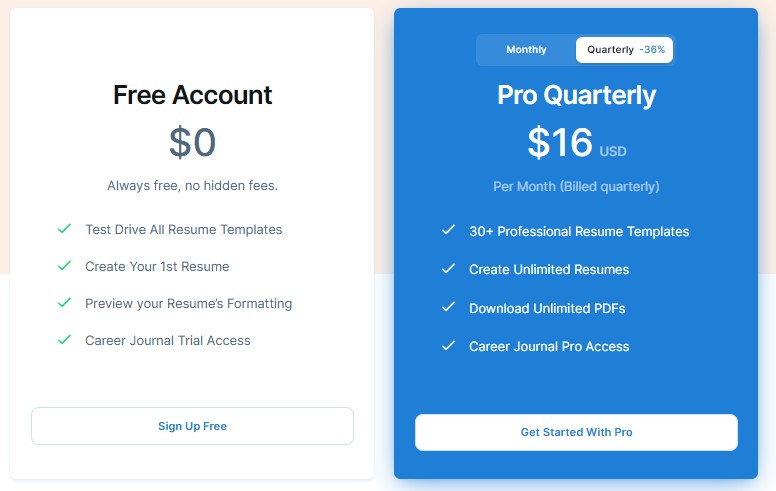
Let’s talk about VisualCV’s pricing, because I’ve actually used the tool and there’s stuff you definitely need to know-especially about all those fees that just keep coming. Don’t let the fancy resume templates fool you, here’s the real breakdown:
Free Plan ($0-Always Free)
- You can try out all the resume templates and make your first resume for free, which sounds nice at first.
- But here's the catch: you only get to create one resume. Want to make another or customize for a specific job? Nope, gotta upgrade and pay.
- The free perks like previewing formatting and career journal "trial" are pretty limited. After using it, I honestly felt more teased than helped.
Pro Plan ($16/month)
- This is where things get pricey. It’s $16 every single month (so that’s $48 every three months, since they bill you quarterly), and it doesn’t matter if you barely used it-the charge still shows up.
- Bro, all the “unlimited resumes” and “unlimited downloads” sound cool, until you realize you’re just renting the same features each month. And if you miss a month? You can’t roll over your credits or access; your money’s just gone.
- You do get access to 30+ templates, a career journal, a website, and analytics. But honestly, for most folks, you don’t need to be forking out $16 each month just to keep your resumes alive. In my eyes, it’s totally not worth locking yourself into yet another subscription.
Pro Quarterly Plan ($16/month, billed quarterly)
- So this is the same as the standard Pro, but instead of paying monthly, they whip out three months’ worth of payment all at once. That’s $48 up-front-even if you only wanted it for a month.
- Again, the moment you stop paying, access is gone. And trust me, they’re not giving you a “break” or any sort of price reduction for paying more at once. You’re just giving them more money upfront, with no extra benefit.
- Based on my own trial, VisualCV just feels much more expensive than it should be for what you get. The best companies might be using VisualCV, but regular folks like you and me are paying a lot more than we should.
Here’s why you should skip VisualCV
- You’re literally paying rent for your own resumes each month. If you stop paying, you lose access-even if you barely touched the service.
- It might look fancy, but you’re stuck in a cycle where old credits don’t carry over and you’re forced to pay again and again, no matter what.
- There are way better, more affordable options out there where your money actually gives you lasting value.
Why ResumeJudge Just Makes More Sense
- With ResumeJudge, you only pay once, starting at $14, and you get 50 resume scans or optimizations-that never expire. No monthly bills, no suddenly losing access.
- It’s not just about building a pretty resume. ResumeJudge actually scans your resume, gives you real ATS feedback, fills in gaps, optimizes it, and provides templates that are truly ATS-friendly. No fake promises, just stuff recruiters and bots actually like.
- You don’t need to pay every month just to tweak one more resume. Use your credits whenever you want-days, months, even years later.
- In my opinion, ResumeJudge saves you both headaches and money. You actually get to keep what you pay for, and you can use features anytime you need-no more monthly surprises.
- If you want to see how VisualCV and ResumeJudge stack up for real, I’ve put together a side-by-side right here.
What are some VisualCV alternatives?
VisualCV Alternatives
 ResumeJudge
 Jobscan
 SkillSyncer
Alright, so you’ve seen what VisualCV can do (and, honestly, what it can’t). But before you decide, let’s check out some other options. Here’s my top pick:
#1 - VisualCV vs ResumeJudge
-
What’s the same: Both VisualCV and ResumeJudge help you make a resume online, give you templates, and let you edit stuff easily. You can use both on your phone, and both are pretty simple to figure out.
-
Why ResumeJudge is better:
- Real ATS checks, not just looks. ResumeJudge actually scans your resume like those job robots (ATS) do, so you know if your resume will get seen by real people. It tells you what’s missing and how to fix it, not just if it “looks nice.”
- One-click job matching. You can paste in the job you want, and ResumeJudge will instantly tweak your resume to fit that job. No more guessing what to change!
- No sneaky subscriptions. You just buy credits once, and they never expire. No monthly fees, no “oops, your credits are gone,” and no surprise charges.
- Templates that work everywhere. The designs look good and work with those job robots, so you don’t get rejected for silly reasons.
- Support that actually helps. If you get stuck, ResumeJudge’s support is friendly and actually answers you, not just some robot reply.
-
Where VisualCV is better:
- Quick mobile edits: If you need to change your resume on your phone super fast, VisualCV makes that easy.
- Simple to use: The platform is pretty straightforward, so you won’t get lost.
But honestly? If you want your resume to actually get seen by real people and not just look pretty, I’d go with ResumeJudge. Plus, you don’t have to worry about paying every month or losing your credits.
#2 - VisualCV vs Jobscan
-
What’s the same: Both VisualCV and Jobscan help you get a better resume to land more interviews. They both have templates, let you tweak your resume, and want to make your job hunt easier (or at least less annoying).
-
Where Jobscan is better:
- Awesome for keyword and ATS checks: Jobscan is super focused on matching your resume to job descriptions, showing keywords you’re missing, and giving you a real score for how likely you are to get through those online filters.
- Extra resume tools: You also get in-app editing, LinkedIn optimization, and even some fancy formatting tips.
- Pricing fits serious job seekers: Pretty pricey, but you get a lot: $49/month, $89/quarter (~$29.67/month), or $149/year (~$12.42/month). There’s way more in-depth scanning, especially if you’re sending out a ton of resumes.
-
Where VisualCV is better:
- Easier to use: VisualCV is super simple-making tweaks or fixing stuff is no big deal.
- You can work from anywhere: Need to edit your resume on your phone in the car or right before an interview? No problem.
- Free for basics: If you just want one basic resume, the free plan is chill.
-
Quick tip: If you’re all about hardcore job application tweaking and want deep resume scans, Jobscan is your buddy. But for quick, everyday resume edits-even on your phone-VisualCV is less stressful… just be ready for some surprise fees if you ever upgrade.
#3 - VisualCV vs SkillSyncer
-
What’s the same: Both VisualCV and SkillSyncer try to make your resume better for the jobs you want. You can use both to help your resume stand out and get noticed by those pesky bots (ATS).
-
Where SkillSyncer is better:
- It’s easier on your wallet: With SkillSyncer, you start at just $14.95 a month (or even cheaper if you go quarterly), and they throw in some free scans every week to get you started.
- Super focused on job-matching: You get tools just for comparing your resume to job descriptions, a tracker for all your applications, and even a little AI help to add the right keywords in a snap.
- Works great for tailoring: SkillSyncer is all about helping you update your resume again and again for each job you find, so you're always ready to go.
-
Where VisualCV is better:
- Editing’s a breeze: If you want to change stuff or fix your resume real quick (even on your phone), VisualCV is super simple and you don’t get lost.
- Nice design: It just looks pretty, and you don’t have to be a tech genius to figure it out.
So yeah, if you want to keep tweaking your resume on any device or have it look really nice, VisualCV is pretty handy. But for job-specific resume matching and saving a bit of cash, SkillSyncer might be the smarter pick!
Is VisualCV Worth It?

In short - Honestly, I'd say NOPE.
Here’s what makes VisualCV really hard to recommend:
-
Reason #1: Customer Service Is a Nightmare: If you ever need help, good luck! Their support barely replies, and getting your money back? Forget about it. I tried - just ended up frustrated and ignored.
-
Reason #2: Expensive Subscription Traps: VisualCV makes you pay these high fees every month, and if you don't use your credits, they're gone for good. You're basically paying for nothing if you even skip a month.
-
Reason #3: Random Price Jumps Without Warning: One day your plan costs a few bucks, then the next, it's suddenly over a hundred bucks more. No heads up, no explanation. It just feels like they’re milking users for every penny.
Here's a review by Felipe Lopes GB regarding a price hike:
"1100% hike on prices Those guys just decided to charge me instead of $12 per year, $144!!! I want you to delete my account and refund me right now!"
― Felipe Lopes GB
So, what should you do instead?
I gotta be upfront - ResumeJudge totally fixes everything that annoyed me about VisualCV.

Here’s why I feel ResumeJudge is the better option:
-
#1 It Actually Tailors Your Resume: ResumeJudge knows that a student, a pro, and a senior expert shouldn’t all look the same on paper. Unlike other resume apps that just shove you into a template, this one fine-tunes your resume details, keywords, and job logic based on who you are and what you’re aiming for. It just gets it.
-
#2 Your Credits Last Forever: You buy credits, they’re yours. No expiry. Use them whenever you want, no pressure, no wasted money.
-
#3 Support That Cares: Every time I needed help, I got a real answer (from a real person!) fast. You’re not stuck yelling at a chatbot that never helps.
-
#4 Built with Real Hiring Know-How: ResumeJudge was made by engineers who know exactly how hiring bots filter resumes. It’s not just about pretty templates. Everything-the resume builder, ATS scanner, keyword optimizer, and more-is in one place and is actually designed to help your resume get seen by real recruiters. No tools to juggle, and no guesswork.
Alright, that's everything you need to know about VisualCV and why it didn't work out for me. If you want to check out ResumeJudge for yourself, you can hit up the main site or just try a 10-scan free trial. No credit card or phone needed - just sign up with your email and see if it actually helps!
Share this article:
Ready to optimize your resume?
Use ResumeJudge to scan your resume against any job description and discover what's holding you back.
Free to use • No credit card required