ResumeKraft Review: I Tried it for 14 Days - Here's What I Found [3 Pros, 5 Cons]
In This Guide:
Read this article if...
you keep hearing about ResumeKraft but aren't sure if it's worth your time or money. Trust me, I dove deep into ResumeKraft so you don't have to, and what I found might surprise you.
I'll break down the 3 things ResumeKraft actually does right-because yes, there are a few gems here.
But hey, I won't sugarcoat it. I'll lay out the 5 big mistakes ResumeKraft makes that almost nobody talks about.
You probably wonder about the costs. I'll give you all the details on ResumeKraft pricing-no confusing jargon.
And if you're already thinking, "What else is out there?", I've listed the best ResumeKraft alternatives for you to check out.
Most importantly, I get this a lot: Is ResumeKraft legit? I’m going to share my honest answer, based on real use.
Skip this ResumeKraft review and you might miss some huge dealbreakers and time-saving tips.
So stick around-I promise it's not your average review. I've put ResumeKraft through its paces just so you don’t waste your time or money.
Take a minute, scroll through the table of contents, and dive into whatever part grabs your attention.

ResumeKraft Review Summary
ResumeKraft Review Summary


If you're in a rush, here's a quick 2-minute summary of this blog:
3 Things ResumeKraft Does Well
-
Safety and Trust: People report that ResumeKraft is legit, with nothing suspicious going on, so you won’t have to worry about scams.
-
ATS Optimization: If you’re unfamiliar, ATS is the system companies use to read resumes, and this tool makes sure yours passes through with no issues. Keep in mind, though, that some users have raised points about customer support and pricing-see more in the cons section.
-
Tailored Resumes: You’ll get a resume that’s actually fitted to your job type and career goals, not just a random cookie-cutter template.
-
Want more highlights? Read on here.
5 Big Mistakes ResumeKraft Makes
-
Terrible Customer Service and Refunds: If you ever need to get your money back or cancel, good luck. They make it super confusing, most folks just give up before anyone helps.
-
Expensive Subscriptions & Lost Credits: ResumeKraft locks you into pricey monthly plans, and if you forget to use your credits, they disappear. So, you end up paying more while getting less.
-
Misleading ‘Free’ Promises: They pull you in with promises of being free, but after you put in all that time making a resume, you’re hit with a paywall and have to subscribe.
-
Resumes Aren’t Really ATS Friendly: They say their resumes beat the bots, but turns out, their fancy templates often mess up with real hiring systems. You may not even get seen by employers.
-
No Mobile App: You can’t make or edit your resume from your phone, so if you’re on the go or don’t have a laptop, you’re basically out of luck.
-
Details on the dark side of ResumeKraft below.
What Does ResumeKraft Cost?
-
Basic Resume Builder – It’s actually free to use if all you want is their basic builder. Sounds good, right? But honestly, it offers pretty basic designs only.
-
Free Templates – Some templates cost nothing, which I like. But these free ones are super limited in style and options, so you might feel a bit stuck.
-
Premium Templates (1-Page) – If you want a fancier look, these cost $10 each. Not crazy expensive, but still a chunk if you just need one resume.
-
Premium Templates (2-Pages) – A longer, two-page resume jumps to $19 for each template. Feels steep to me, especially with no customization included.
-
So should you buy ResumeKraft? I’d say skip it, mostly because the pricing isn’t clear upfront and you might feel tricked into paying after making your resume. More details about its cost below.
ResumeKraft Review - What Does it Get Right?
ResumeKraft Pros
Here are 3 things people really talk about with ResumeKraft:
-
Safety and Trust:
- You can use the site without getting worried about scams or something shady.
- People say ResumeKraft is totally legit and has a good trust score online.
- You don’t have to freak out about giving your info to some sketchy site.
-
ATS Optimization:
- The tool makes your resume easy for those company machines (ATS) to read.
- ResumeKraft actually writes your resume from scratch to work with these systems.
- Hiring experts even look it over, so you know it’s got some real review behind it.
- It isn’t always cheap though-see what folks say about that down in the cons section.
-
Tailored Resumes:
- Your resume gets tweaked to match your specific job or whatever goals you have.
- You don’t just get a random template everyone else has; it feels more “yours.”
- The pros say they’ll look at your background and make it fit, not just copy-paste stuff.
Here's a user talking about resumekraft.com:
"resumekraft.com is legit and safe to use… positive trust score"
― Anonymous
5 Big Mistakes ResumeKraft Makes
ResumeKraft Cons
Alright, let’s get real about the top 5 things ResumeKraft totally drops the ball on:
-
Terrible Customer Service and Refunds
- If you ever try getting your money back or canceling anything, good luck. You get dragged through endless steps and half the time no one even answers your emails.
- Folks online say they just give up because support doesn’t reply or help with refunds. From what I’ve seen, it’s like talking to a wall.
- It just feels like they hope you’ll get bored and stop asking for your money-definitely not what you want when money’s on the line.
-
Expensive Subscriptions & Lost Credits
- ResumeKraft hooks you into paying for a pricey monthly plan, but if you forget to use your credits that month? Poof-they’re just gone, you can’t save them for later.
- Tons of users hate that they pay all this cash and then lose credits if life gets busy. Even I felt ripped off when I saw my unused stuff disappear.
- You end up spending way more than you wanted and getting way less-honestly more annoying than helpful.
Here's a review talking about deceptive practices preying on job seekers:
"ATS friendly and all that other shit is just preying (profiting) on ignorant, desperate job seekers."
-
Misleading ‘Free’ Promises
- They tell you it’s free, but after you spend ages making a resume, bam! You hit a paywall and have to shell out to download.
- It leaves you feeling tricked because you invested your time only to find out nothing is free here. I got frustrated too the first time.
- Lots of folks say just use Google Docs or Word because at least you know where you stand upfront. No surprises, just your own work.
-
Resumes Aren’t Really ATS Friendly
- They promise their fancy templates will get past those job-application bots, but yeah, that’s not really true. Many times resumes made here actually mess up in real hiring systems.
- Reviewers mention they get rejected or go unnoticed because the pretty designs confuse the bots. I tried once and realized a simple Word doc works better for getting noticed.
- So it’s kind of a trick-they profit from people who don’t know better, and then you wonder why you’re not hearing back from jobs.
-
No Mobile App
- If you want to make or fix your resume on your phone or tablet, you’re out of luck-ResumeKraft only works on computers.
- This sucks if you’re traveling or don’t own a laptop. People online and my friends hate this, especially when you’re job hunting away from home.
- You basically have to use something else if you need to tweak your stuff on the go, which just defeats the point of a modern resume tool.
Here's a review by a user discussing their experience with so-called free websites:
"Spent over an hour on 3 different ‘free’ sites… then subscription."
― Reddit User
By the way, if you're after a service with no forced subscriptions and lifetime-valid credits, you should check out ResumeJudge. You can even get started with a free trial (up to 10 scans!) through this link.
That wraps up the in-depth overview. Interested in exploring more alternatives to ResumeKraft? But first, let’s go over the pricing details!
What Does ResumeKraft Cost?
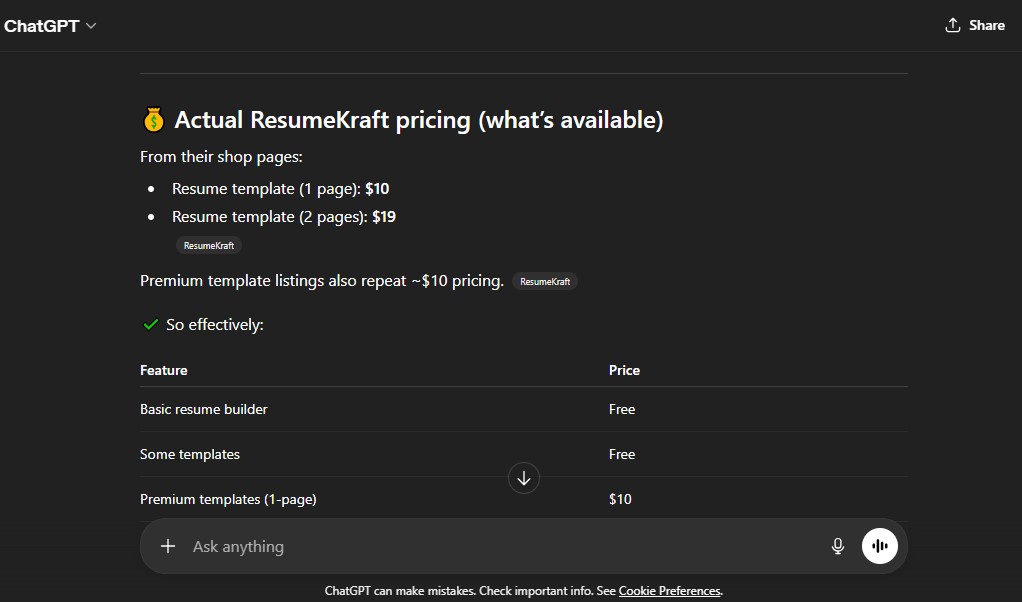
You might see ‘free’ all over the ResumeKraft site, but let me break down what you’re really getting-and where you actually have to pay.
Free Plan
- You do get: the online resume builder, some basic templates, and you can download your resume as a PDF if you’re using those basic layouts. So far, so good, right?
- But here’s the catch-they call it “completely free to use,” but that’s only if you stick to the small pool of bland, kind of boring templates. Anything that looks a bit more professional or modern? Yeah, that’s all paid.
- I’ve tried it myself, and I find their “free” plan feels like a teaser just to get you to check out those locked premium templates. You don’t even see pricing until you try to use a nicer design!
Premium Templates (One-Time Purchase)
- Want a fancier resume that actually stands out? You’ll have to buy a template. A single-page template costs $10, and if you want a 2-page version, it’s $19-every single time.
- These prices are per-template, not per account. So if you want to try a few styles or update your resume down the line, you’re shelling out $10 or $19 each go. That adds up quick, especially since they don’t bundle pages, and you only get the design format, not any extra features.
- None of these paid options come with any sort of smart resume scan, feedback on your content, ATS scoring or optimization. It’s literally just a design file-nothing fancy beyond the look.
Why ResumeKraft’s Model is Pretty Sneaky (and Costly)
- All the “no subscription” talk sounds good until you realize you’re basically buying the same thing over and over, every time you want a new look or update your CV. It’s not a membership, but you’re locked into paying whenever you want anything better than basic.
- If you’re hoping to edit, refresh, or try a few different looks for your job search, this gets expensive fast. And trust me-as someone who’s had to update resumes a lot-you will want to tweak your design or add pages over time.
- Plus, the split between free and premium is confusing as heck. You see “free builder” on every page, but most actual, modern templates are behind a paywall you don’t see until after you’ve spent the time to build your resume.
Here’s what I honestly recommend...
- You’re way better off with ResumeJudge, which goes way beyond just templates. It’s not just a builder-it’s a full ATS resume check, optimization, keyword boost, and pro templates all bundled together for a one-time payment.
- No subscriptions ever, and your scan credits never expire. You get 50 resume scans for just $14-and you use them whenever you actually need them, not stuck paying again or re-buying templates every single time.
- You get actual feedback on your resume, instant optimization, ATS-friendly formatting, plus the power to check and improve your resume as much as you need for just one payment.
- I’ve saved way more money and gotten better interviews with ResumeJudge compared to nickel-and-diming myself endlessly with ResumeKraft’s paid templates.
Want to see exactly how ResumeKraft stacks up against ResumeJudge? Jump to the deep-dive right here.
What are some ResumeKraft alternatives?
ResumeKraft Alternatives
 ResumeJudge
 MyPerfectResume
 ResumeIO
You’ve seen what ResumeKraft can do (and where it totally drops the ball). But before you jump in, let’s check out some other options. Here’s my top pick:
#1 - ResumeKraft vs ResumeJudge
-
What’s the same: Both ResumeKraft and ResumeJudge help you make a resume with templates and tools, so you don’t have to start from scratch. They both say they’ll help you get noticed by employers.
-
Why ResumeJudge is better:
- Real ATS checks, not just fancy looks. ResumeJudge actually scans your resume like the robots companies use, so you know if your resume will get seen or tossed. It checks for keywords and all the little details that matter.
- One-click fixes for your resume. You can paste in the job you want, and ResumeJudge will update your resume in one click to match it. No more guessing what to change!
- Templates that work with hiring systems. Their designs look good but also work with the computer systems companies use, so your resume won’t get messed up.
- Pay once, use anytime. You buy credits once, and they never expire. No monthly fees or sneaky charges.
- Helpful support. If you get stuck, real people actually help you out - not just robots or confusing emails.
-
Where ResumeKraft is better:
- Some free templates. If you just want a super basic resume for free, ResumeKraft has a couple of templates you can use without paying.
But honestly? If you want your resume to actually get seen by real companies, ResumeJudge is the way to go. It’s easier, smarter, and you don’t get tricked into paying more than you planned.
#2 - ResumeKraft vs MyPerfectResume
-
What’s the same: Both MyPerfectResume and ResumeKraft help you make resumes online, even if you don’t know what you’re doing. You get to pick from templates, fill in your info, and download your resume when you’re done. They both look fancy at first and promise to help you land more job interviews.
-
Where MyPerfectResume is better:
- Smarter content tips: It throws in AI-powered help, like better phrasing for your job bullets and resume feedback just by clicking a button.
- Extra job tools: You get stuff like interview practice and a neat online resume link to share (not just a boring old PDF).
- Way more styles: MyPerfectResume has a bigger mix of templates and lets you tweak things more, so it actually feels like your resume - not the same as everyone else’s.
-
Where ResumeKraft is better:
- No scam vibes: If you’re nervous about dodgy sites, ResumeKraft feels safe and above board - no scary stuff reported.
- Resumes can fit your job goals: It’s simple to get a resume that matches the job you want, instead of just picking some random style.
- That’s about it, really - nothing fancy, just gets it done.
-
Quick money talk:
- ResumeKraft does have some free templates and a basic builder if you’re not picky, but the good-looking stuff costs $10-19 per template (and you gotta pay before you can even try to download most of them). MyPerfectResume charges around $2.95 for a 14-day full-access trial, then $5.95 to $24.95 for monthly options - so you know the price upfront, no surprises.
Want more about ResumeKraft’s pricing and headaches? Jump to the details.
#3 - ResumeKraft vs ResumeIO
-
What’s the same: Both ResumeKraft and Resume.io are online resume builders you can use right from your computer. Both give you ready-made resume templates, say they help with those tricky ATS bots, and let you download your finished resume. If you want something fast without much hassle, both do the trick.
-
Where Resume.io is better:
- Easier to use and clearer on pricing: Resume.io lays out exactly what you get and what you have to pay-no surprises. You can try out all their templates first, then grab as many PDFs as you want if you pay, which is handy if you need different resumes for different jobs.
- Better file downloads and app access: You can make, edit, and download your resume on your phone because they have a mobile app, and you get Word or PDF formats without a fuss. Plus, their security game is strong with data protection.
-
Where ResumeKraft is better:
- You can try for free: If you just want a basic resume super quickly or need a simple template for nothing, ResumeKraft gives you that without creating an account. Also, you can buy just one template without paying for a whole month, so if you’re really watching your spending, it might be helpful.
Is ResumeKraft Worth It?

Short answer – Sorry, but nope!
Here’s why I wouldn’t recommend it:
-
Reason #1: Customer Service is a Mess: If you try to get help, a refund, or cancel your plan, it's like shouting into a black hole. Most people just give up before anyone helps them. It feels like they make the process confusing on purpose.
-
Reason #2: You Lose Money & Credits Fast: ResumeKraft locks you into expensive monthly plans, and if you miss using your credits, they just disappear. That means you’re paying more and getting less, which really stings.
-
Reason #3: Not Actually Free & Resumes Miss the Mark: The site says it’s free, but right before you can download your resume, it pushes a paywall on you. And even after all that, those “fancy” templates don’t always work with real company systems, so your resume might never be seen by a real person.
Here's a review by an anonymous reviewer sharing their thoughts on resume-making apps:
"No app is good… make your own resume."
― Anonymous
So, what should you do instead?
I’m not just saying this because I love it, but ResumeJudge actually fixes all of ResumeKraft’s problems. Let me break it down:

-
#1 Not Just Another Cookie-Cutter Resume Builder: ResumeJudge gets that a high schooler and a senior engineer shouldn’t have the same resume style. It adapts everything-templates, keywords, even how it organizes your info-based on who you are and what type of job you want.
-
#2 Your Credits Never Vanish: Buy the credits you need, and that’s it-they’re yours forever. No sneaky “use it or lose it” tricks.
-
#3 Customer Support That Actually Helps: Their team always replies quick fast-in my experience, under half a day. And you’ll always be talking to real people, not some bot.
-
#4 Built by People Who Get How Hiring Works: ResumeJudge was made by Google engineers who know what happens to your resume after you click submit. The builder is focused on passing ATS (the software that scans resumes) and making your application rock, not just look pretty on the page. And you don’t have to use a bunch of tools or guess if it’s working-they keep everything you need in one place: resume builder, scanner, keyword optimizer, and more.
So there you have it! Hope this helped clear things up about ResumeKraft. If you’re tired of wasting time and want a fresh start, check out ResumeJudge’s website or try your 10 free scans. There’s no trickery-just put in your email and go, no credit card or phone needed.
Share this article:
Ready to optimize your resume?
Use ResumeJudge to scan your resume against any job description and discover what's holding you back.
Free to use • No credit card required