ResumeBuilder Review: I Tried it for 14 Days - Here's What I Found [3 Pros, 5 Cons]
In This Guide:
Read this blog if...
you're thinking about using ResumeBuilder but don’t know if it’s actually worth it? Well, I’ve spent hours tinkering with every nook and cranny of this tool-and I’ve got the inside scoop just for you.
I'll walk you through the 3 things ResumeBuilder does surprisingly well and reveal the 5 big mistakes it makes (so you don’t fall into any traps).
Worried about pricing or hidden fees? Relax, I’ll spill the beans on what ResumeBuilder actually costs-nothing hidden here.
Don’t know if there are better options? Yup, I’ve found some ResumeBuilder alternatives you might want to check before you decide.
And I know you’re wondering: Is ResumeBuilder legit or just hype? I’ll answer that with real examples, no sugarcoating.
Honestly, if you miss this ResumeBuilder review, you might end up wasting money or missing out on a better tool. I’m keeping things honest so you don’t get burned.
I’ve done the hard work, read plenty of user stories, and tested ResumeBuilder myself. All you have to do? Sit back and soak it in.
Btw, we've got a handy table of contents on the side-jump to whatever section piques your interest!

ResumeBuilder Review Summary
ResumeBuilder Review Summary

If you're in a rush, here's a quick 2-minute summary of this blog:
3 Things ResumeBuilder Does Well
-
Easy-to-use Interface: You’ll notice it’s pretty simple to make or update a resume without much confusion, even if you’re new to this stuff.
-
Quick Resume Creation: If you’re in a hurry, you can get your resume done fast, so you won’t spend hours just fixing it up.
-
Templates for Resumes and Letters: There’s a bunch of ready-made layouts for your resume and follow-up letters, which saves you time figuring out how things should look. But some features like better customer assistance or more affordable pricing are missing, as discussed in the cons section.
-
More on what makes ResumeBuilder useful here.
5 Big Mistakes ResumeBuilder Makes
-
Terrible customer service for refunds and cancellation: If you ever try to get your money back or stop your subscription, good luck! You’ll find it’s super hard and nobody seems to help you out.
-
Tricky subscription and disappearing credits: They lock you into an expensive monthly plan and if you don’t use your credits, poof, they vanish at the end of the month, so you end up paying way more than you should.
-
Hidden costs after you’ve done all the work: It says the tool is free, but right after you finish your resume, it suddenly asks you to pay. Kinda feels like a bait-and-switch, right?
-
Takes your personal info before showing the price: You only learn there’s a payment at the very end-by then, they already have your name, email, and job history, which feels sneaky.
-
Pushy review requests and bad vibes: It tries to force you into writing reviews, even if you’ve barely used the thing, which just feels super annoying and pushy.
-
More about ResumeBuilder’s issues below.
What Does ResumeBuilder Cost?
-
Free Plan – It lets you build your resume for $0, and you can use every feature, but you'll have to download your resume in plain text (TXT) only, which honestly looks pretty boring.
-
14-Day Full Access Trial – For $2.95, you get 14 days to test everything and download your resume as a Word or PDF, which is more polished. But after the trial, it jumps up to $23.95 every 4 weeks, which feels pricey if you just need a resume fast.
-
Annual Access Plan – This one’s $7.95/month if paid all at once for the year ($95.40 total). You get all the bells and whistles plus Word and PDF downloads, but you have to pay for 12 months upfront, which can be a lot if you only need it once.
-
So should you buy ResumeBuilder? Honestly, I wouldn’t unless you need resumes all year. The ongoing pricing isn’t cheap, especially since free downloads are only text. More cost details down here.
ResumeBuilder Review - What Does it Get Right?
ResumeBuilder Pros
Here are 3 things that stand out and most folks notice right away:
-
Easy-to-use interface:
- You can just hop in and start making your resume, even if it’s your very first time.
- Customers say it’s smooth and not confusing to update info or fix up your old resume.
- If you’re helping out friends or family, you don’t need any training at all.
-
Quick resume creation:
- You get your resume done fast, so you won’t waste your whole day on it.
- The steps are simple, and you don’t get stuck trying to figure out what’s next.
- Just a heads up - you gotta remember to cancel your subscription or else you might end up paying more than you want. If you care about fees or support, check out the cons section.
-
Templates for resumes and letters:
- There’s a bunch of templates that make your resume and even cover letters look pretty clean without you stressing about design.
- People say these templates save them time and make their job applications look nice and put together.
- Using the templates helps keep stuff like follow-up letters consistent, so the whole job search looks more professional.
Here's Steven Peter MY talking about their experience:
"Easy and smooth to make a resume from scratch or update your current resume!"
― Steven Peter MY
5 Big Mistakes ResumeBuilder Makes
ResumeBuilder Cons
Alright, let's chat about the 5 things ResumeBuilder just can't seem to get right:
-
Terrible customer service for refunds and cancellation:
- If you ever need a refund, good luck getting one. It feels like you're just yelling into a void and nobody really listens.
- Folks are super annoyed about how hard it is to actually cancel your plan or get any help with payments.
- I’ve reached out myself and, honestly, it took way too long for anyone to bother replying.
-
Tricky subscription and disappearing credits:
- They pull you into these pricey monthly plans, and if you don’t use your credits that month, they just disappear without warning.
- I noticed quickly that my unused credits totally vanished, so you’re just wasting money if you forget even once.
- It's tricky because you think you’re getting a deal until all your progress and credits reset and you’re left with nothing.
Here's a review by Alessio Sundas IT expressing concerns over an unauthorized transaction:
"I demand a refund. How did you get my debit card information?"
― Alessio Sundas IT
-
Hidden costs after you’ve done all the work:
- So, you spend all this time building your resume, and right when you’re done, boom-they ask for cash.
- From my experience, you won’t see a price tag until you’ve put in all your personal details.
- Loads of real users feel scammed because it’s advertised as free but you only find out about the paywall at the very last step.
-
Takes your personal info before showing the price:
- You give them your name, email, work history, and only after that do they ask you for money.
- Honestly, I don’t like giving out my info when I don’t even know the final cost up front-it just doesn’t feel right.
- Tons of folks in reviews complain that this feels pretty sneaky and makes them not trust the site.
-
Pushy review requests and bad vibes:
- Even if you barely tried the site, it nags you to leave a review right away, which just gets super annoying.
- People say they feel forced to leave a review even before using the tools, and it’s not a great first impression.
- When I tried it, I got pop-ups and emails almost instantly asking for feedback, making the whole thing feel desperate.
Here's a review by Thanusha Ekanayake LK with their experience:
"Says free but at the end, it's not. Says free but all details have been entered, it asks you to pay. You already got my information then you ask me to pay as well? Absolute scam."
― Thanusha Ekanayake LK (1 review, Jan 14, 2026, Rated 1 out of 5 stars)
By the way, if you’re looking for a service where you don’t have to worry about monthly payments and your credits stay available forever, check out ResumeJudge. You can test it out with up to 10 free scans right here.
That covers the in-depth overview. Interested in exploring some more ResumeBuilder alternatives? But first, let’s review the pricing details!
What Does ResumeBuilder Cost?
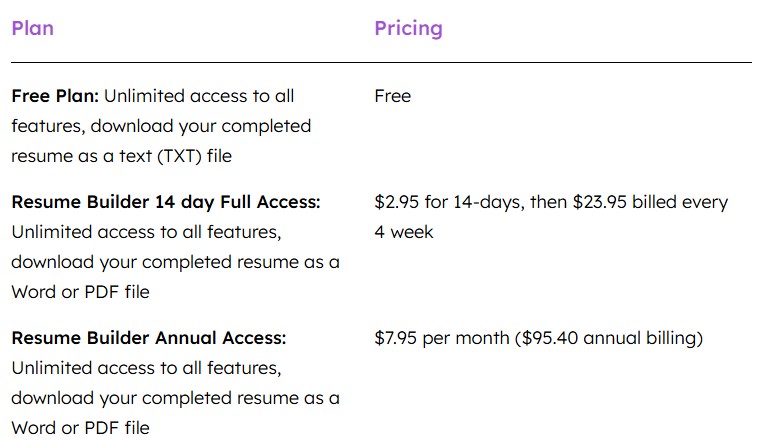
Okay, let me walk you through ResumeBuilder’s pricing because-I’ve gotta be honest-it's pricier than it looks at first glance, and you’re getting charged like clockwork for the same thing each month whether you use it or not.
Free Plan
- You get: Unlimited access to all features, but you can only download your finished resume as a TXT file. That’s literally just plain text, no formatting, nothing fancy.
- If you want a resume that looks half decent or is ready to send to an employer, you’re not gonna get that on the free plan. I tried it myself, and it’s honestly just a generic text blob.
- So yeah, technically ‘free’, but not actually useful unless you just want to copy-paste and format everything yourself in Word or Google Docs-not fun, not easy.
14-Day Full Access Trial ($2.95 for 14 Days, then $23.95 every 4 weeks)
- They’ll let you into everything for $2.95 for 14 days-so you can download your resume as Word or PDF. But after that, if you forget to cancel, they whack you with a $23.95 charge every 4 weeks. That’s basically $24 a month just for the privilege.
- Even worse? You’re paying that every single month, just to keep using those exact same features. If you forget or don’t need it, you’re still losing that money. It doesn’t matter if you didn’t make any changes or update your resume, they still bill you. I actually lost money this way when I got distracted and forgot to cancel.
- Let’s be real, most of us only update our resumes a few times a year, so paying $24 every month is just overkill. If you’re not using it, you still lose your cash-no rollovers, no backup, just more charges.
Annual Access Plan
- This one gives you unlimited resume and cover letter features, plus downloads to Word/PDF, for the whole year. But, nowhere do they tell you what the yearly price actually is up front-you have to dig. (Spoiler: it's way more expensive up front.)
- And again, you're pre-paying for the year-so if you just need your resume for a job hunt and then nothing for months, your money is already gone.
- I’ve found the yearly option really only saves you a bit compared to their sneaky monthly price, but if you’re like me and just want to fix up your resume for one job, you’re kind of forced into a giant bill. That doesn't feel fair.
Here’s the kicker: you’re paying them again and again every month or year, just to keep your access. If you stop paying, you lose it-nothing rolls over, and none of your credits or unused downloads stay with you. It’s almost like paying rent for an apartment you’re never in, but you still have to send a check anyway.
But listen, there are way better options out there that don’t make you jump through hoops or drain your wallet dry.
- ResumeJudge is so much better-it does way more than just let you build a template. You get a full ATS scan, real scoring, keyword fixes, auto-optimization, templates, even an auto-applier-and you pay just $14 ONCE, not over and over.
- Best part? Your credits NEVER EXPIRE. So, pay $14, get 50 resume scans, and use them whenever you want. No subscriptions, no “forgot to cancel” drama, way more features, and you keep access for life.
- Want to see a real comparison? Jump to the ResumeBuilder vs ResumeJudge breakdown here.
What are some ResumeBuilder alternatives?
ResumeBuilder Alternatives
 ResumeJudge
 ResumeIO
 MyPerfectResume
You already know everything there's to know about ResumeBuilder. Before taking the final call, let's look at a few alternatives. Let's look at the top 3:
#1 - ResumeBuilder vs ResumeJudge
-
What’s the same: Both ResumeJudge and ResumeBuilder help you craft a resume - providing templates, examples, and tools that aim to make your resume look professional and improve your chances of landing interviews.
-
Why ResumeJudge is better:
- True ATS analysis, not just pretty templates. ResumeJudge’s core strength is its deep ATS scanning and actionable insights: its AI analyzes your resume the way real applicant tracking systems do, checking dozens of compliance factors and keyword matches so you know exactly what’s missing and why - not just that your formatting “looks clean.”
- One-click optimization actually works. Unlike builders that give general writing tips, ResumeJudge lets you paste the exact job description and then instantly optimize your resume with one click - updating bullets, skills, and structure to match the role you want, saving hours of manual edits.
- Templates and examples that compete with the best. ResumeJudge offers clean, ATS-friendly templates covering simple to modern designs that parse well with recruiter systems - matching the professional look and flexibility of ResumeBuilder’s designs but with ATS compatibility prioritised from the start.
- Credits never expire - one time payment. With ResumeJudge, you pay once for credits, and those credits never expire, meaning no recurring subscriptions or surprise costs.
- Actually great customer support. ResumeJudge users report helpful, responsive support geared toward real job seekers, not automated replies - something many users find refreshing compared to generic support tied to subscription software.
-
Where ResumeBuilder.com is better:
- Huge library of examples and guided writing help: ResumeBuilder has more than 500 resume examples and step-by-step guidance and templates to help you draft text from scratch.
- Mobile-friendly resume creation: Their builder works smoothly in browser on phones and tablets for quick edits on the go.
#2 - ResumeBuilder vs ResumeIO
-
What’s the same: Both ResumeBuilder and Resume.io let you build resumes online, use ready-made templates, and download your finished resume in PDF or Word. They aim to help regular people make a good-looking resume fast, even if you’re not a design pro.
-
Where Resume.io is better:
- Easier with free downloads: Resume.io actually lets you download a plain text version for free, plus it’s upfront about pricing before you start entering all your information.
- Smoother experience: People seem to have fewer problems with billing and refunds on Resume.io, and the platform just feels a bit more trustworthy.
- More positive customer reviews: Users say Resume.io’s support is friendlier and less sneaky, so you don’t run into as many unexpected surprises when using the tool.
-
Where ResumeBuilder is better:
- Super quick and simple: If you just want to bang out a basic resume in record time, ResumeBuilder is pretty much as easy as it gets.
- Templates for both resumes and letters: You also get some basic cover letter tools along with your resume, all on the same site.
In short: Resume.io feels a bit safer and easier, but ResumeBuilder is hard to beat for pure speed if you just want to get your resume done in minutes.
#3 - ResumeBuilder vs MyPerfectResume
-
What’s the same: Both ResumeBuilder and MyPerfectResume help you whip up resumes online using step-by-step builders, a bunch of easy-to-pick templates, and some tips to guide you along the way. They both let you download your finished resume as a PDF or Word doc once you’re done.
-
Where MyPerfectResume is better:
- Better help with content: It’s got more built-in tips and suggestions for what to actually write, plus there’s AI help if you get stuck, and a tool that gives you feedback on your writing.
- Extra career tools: You can turn your resume into an online link, prep for interviews, and use other job hunting extras.
- More design choices: MyPerfectResume gives you more template styles and ways to switch up the look, so your resume can match your vibe.
-
Where ResumeBuilder is better:
- Way easier and faster: If you just want to make or fix up a resume fast, ResumeBuilder is super simple and works smoothly, even on your phone.
- You actually see the prices: ResumeBuilder tells you right away what it’ll cost-like $2.95 for a 14-day trial-so there aren’t any price surprises at the end.
Is ResumeBuilder Worth It?

Short answer - Honestly, I’d skip it!
Here’s the deal:
-
#1: Awful Customer Service: Trying to get help with refunds or canceling your plan feels impossible. If you ever want out, just be ready for some serious headaches and zero support. I’ve tried - and I know how frustrating that can be.
-
#2: Tricky, Sneaky Subscriptions: They lock you into expensive monthly payments, plus all your unused credits just disappear at the end of each month. It just feels kind of unfair, and I hate wasting money that way.
-
#3: Hidden Fees and Data Grabs: You’ll pour in all your info, thinking it’s free, but when you’re done? Bam! They make you pay. By then, they’ve already got your details. It just feels super sneaky to me.
Here's a review by Autumn Keenan CA sharing their experience:
"Bulshit Bulshit. Makes you do the entire process before asking for money. Is not free."
― Autumn Keenan CA
So what should you use if ResumeBuilder is this much hassle?
I'm gonna be straight with you: ResumeJudge fixes all the stuff ResumeBuilder gets wrong. Here’s why I keep coming back to it:

First off, you can try out 10 scans for free-no strings, no card needed. But here’s the best part:
-
#1: Not Some Generic Cookie-Cutter Builder: Look, ResumeJudge actually gets that everyone’s different. It builds your resume based on who you are - whether you’re in school, just starting out, or already deep into your career. Each resume is made to fit the job you’re trying to get, instead of pumping out the same boring template for everyone.
-
#2: Credits Don’t Expire (Ever): If you pay for credits, they never go away. Seriously, I’ve had mine sitting there for months and they’re still good. No more paying for stuff I don’t use.
-
#3: Real People, Really Fast Responses: I’ve messaged their support and always got an answer from an actual person within hours. No robots, no waiting days for a reply.
-
#4: Built By Resume Nerds with Insider Knowledge: The ResumeJudge team worked at Google and actually knows how those picky ATS systems read resumes. So when you use their builder, you get a resume that isn’t just pretty-it actually gets through those nitpicky filters. And you don’t have to bounce between a million tools; their dashboard does it all: building, scanning, optimizing, you name it.
If this helped you at all, awesome! If you wanna try out ResumeJudge, I’d say give their site a peek, or jump right in with the 10-scan free trial. You don’t even need your card or phone-just your email, and you’re rolling.
Share this article:
Ready to optimize your resume?
Use ResumeJudge to scan your resume against any job description and discover what's holding you back.
Free to use • No credit card required