OwlApply Review: I Tried it for 14 Days - Here's What I Found [3 Pros, 5 Cons]
In This Guide:
Read this article if...
you're asking yourself whether OwlApply is the real deal or just another hype train. Trust me, I dove deep into OwlApply for days, so this OwlApply review is as real as it gets.
I’ll chat about the 3 things that OwlApply absolutely nails and also, the 5 big blunders it makes (because let’s be honest, nothing’s perfect).
You probably want the lowdown on pricing too, right? Don’t worry, I’ll explain exactly what OwlApply costs.
Wondering if there are any alternatives, or if this is really the tool for you? Yeah, I’ve put together a couple of solid options you might want to check out.
Plus, I’ll get straight to the burning question: Is OwlApply legit, or are you just wasting your time?
If you skip this blog, you’ll miss out on tips, fresh experiences, and everything you need to decide if OwlApply is actually worth it.
I’ve spent hours digging into real-world use (and reading through dozens of user reviews) to make sure you get the truth.
Grab your coffee, relax, and let’s jump into this OwlApply review together!
And hey, the Table of Content’s right there if you want to jump to any bit that catches your eye.

OwlApply Review Summary
OwlApply Review Summary


If you're in a rush, here's a quick 2-minute summary of this blog:
3 Things OwlApply Does Well
-
One-click job applications: This feature lets you fill out job applications super fast, so you don't spend forever typing the same stuff.
-
Resume scoring: You get to see how your resume matches up with a job, which helps you know if you should even bother applying.
-
Quick cover letter generator: This one spits out cover letters really fast, so you don’t need to come up with something new every single time. (But heads up-there are also some dealbreakers, which you can read more about in the cons section.)
-
For even more on what OwlApply does right, check out the details below.
5 Big Problems with OwlApply
-
Awful Customer Service & Refund Mess: If you ever want a refund or need to cancel, good luck! The support is slow and keeps dodging you, so you’re basically stuck.
-
Expensive, Credits Disappear: You’re forced into a pricey subscription. And get this-your unused credits just vanish every month instead of rolling over, so you end up paying for nothing.
-
Super Generic Applications: The resumes and cover letters it makes are so plain that it’s almost like everyone is sending the same exact stuff. No one wants a cookie-cutter job app!
-
Looks Only at Numbers, Not Quality: OwlApply is all about sending out as many applications as possible, but doesn’t care if they’re actually good. You might get more rejections instead of interviews.
-
Doesn’t Really Save Time: You’ll still have to edit or rewrite a bunch of what it gives you. So you spend extra time fixing mistakes instead of saving time like you hoped.
-
Check out more downsides of OwlApply here.
What Does OwlApply Cost?
-
Free Plan – It’s totally free, so you can try out a basic AI resume builder, cover letter templates, and get some resume feedback. But lots of cool stuff is locked unless you pay.
-
Premium Plan – This plan can cost anywhere from $10 to $30 per month, depending on sales. It gives you all the tools, like job-tailored resumes, autofill, tracking, and even an interview helper. Honestly, I think it can get kinda expensive if you need those extras a lot.
-
Chrome Extension – Anyone can install this for free, but if you want all those automation perks, you’ll still have to pay for Premium. So the free part is a bit limited.
-
Should you buy OwlApply? Honestly, unless you really need the paid stuff, I’d say no. The free plan runs out fast, and the paid one’s pricey. Get all the OwlApply cost facts here.
OwlApply Review - What Does it Get Right?
OwlApply Pros
Here are 3 things most people seem to like about OwlApply:
-
One-click job applications:
- You just hit one button and it auto-fills your job applications, so you don’t have to type all your info again and again.
- People like how this saves loads of time, making the job search less of a headache.
- It really cuts down on boring, repetitive clicking and typing, but sometimes stuff can go a bit wrong if the website is weird.
-
Resume scoring:
- OwlApply checks your resume against job ads and tells you how good the match is.
- You get to see if your resume even stands a chance before you apply, which is honestly pretty useful.
- Folks like that you don’t end up blindly applying, but some also wish the feedback was a little more detailed.
-
Quick cover letter generator:
- Got writer’s block? This spits out a cover letter for you in seconds, which can take a load off your mind.
- It’s super quick, so you actually end up sending more applications without too much hassle.
- Just a heads up though: it’s not perfect every time and if you need help, you might get frustrated by customer support or find it pricey for what you get.
Here's a user talking about OwlApply and its potential benefits:
"What if it could be less like an endless maze of clicking and typing? That’s where OwlApply comes in, claiming to simplify the entire job application experience using AI. I decided to give it a try to see if it truly lives up to its promise or if it’s just another flashy tool."
― Eddy Enos
What OwlApply Gets Seriously Wrong
OwlApply Cons
Alright, let’s talk honestly about the top 5 things that drive people nuts with OwlApply:
-
Awful Customer Service & Refund Mess:
- When you want a refund or need to cancel your subscription, support can take days or just ignore you.
- If you’re having any issue, don’t expect a helpful answer-it usually feels like you’re being pushed aside.
- In my own experience, I kept emailing back and forth, but it was mostly wasted time for nothing to happen.
-
Expensive, Credits Disappear:
- They make you pay for a pretty expensive plan, and if you don’t use up your credits, they just disappear every month.
- When you’re busy and can’t use the tool, you still lose out on what you paid for-your money doesn’t even roll over to the next month.
- I lost a whole chunk of credits just because I forgot about them, and trust me, they won’t get them back for you.
Here's a review talking about their experience with JobOwl:
"CVs and cover letters were increasingly generic… I have canceled the subscription."
― Anonymous
-
Super Generic Applications:
- The resumes and cover letters it spits out all look nearly the same-plain, boring, and totally forgettable.
- Even after tweaking, the results always feel lifeless; in my experience, nothing really stands out to employers.
- If you've seen one resume from OwlApply, it feels like you've seen them all, and that's not good.
-
Looks Only at Numbers, Not Quality:
- This tool only cares about sending out tons of applications fast, but doesn’t care if they’re actually good.
- The more you blast out basic applications, the more rejections you rack up-the tool never checks if apps match jobs.
- I kept getting “Thanks, but no thanks” emails, which showed me just sending more isn’t smart if they’re not quality.
-
Doesn’t Really Save Time:
- You end up fixing or rewriting most of what it gives you because the output just isn’t ready to use.
- Most users and I spend extra minutes editing stuff, which kills the whole purpose of having an “auto apply” helper.
- Feels like double work-first using the tool, then fixing its mess instead of saving yourself any time at all.
Here's a review by Anonymous talking about the effectiveness of auto-apply tools:
"Auto-apply tools usually go for quantity… quantity without quality means you get rejected faster."
― Anonymous
By the way, if you're interested in a platform that offers pay-as-you-go pricing with credits that never expire, check out ResumeJudge. You can even test it out for free with up to 10 scans here.
That wraps up our in-depth overview. Curious about other OwlApply alternatives? Before diving into those, let's go over the pricing details!
What Does OwlApply Cost?
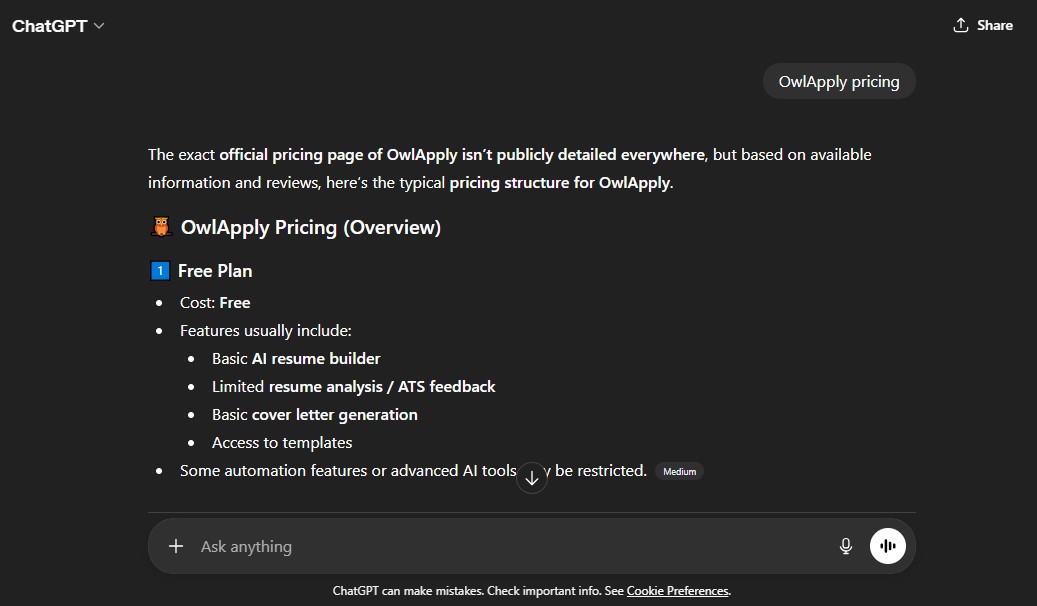
Okay, let me walk you through how OwlApply’s prices stack up, because honestly, I’ve used it, and there are some big issues you’ve got to know before thinking about paying for it.
Free Plan ($0)
- You can use their basic AI resume builder, try out some simple resume templates, and even get a Chrome extension for autofilling. But all this stuff is very limited-you get a taste of the good features, but most things are locked behind their paid plan the second you really need them.
- If you try to do more advanced resume analysis or want decent cover letter help, you hit a brick wall-almost everything useful goes behind a paywall after just a couple tries.
- In my experience, this “free” level is just bait to nudge you into upgrading. It’s like they give you a sample and then hold all the good stuff hostage.
Premium Plan (~$17.49/month)
- This is their main paid option, and wow, it adds up fast. For about $17.49 every single month, you unlock all the “advanced” AI tools-like full resume builder, ATS scoring, better cover letters, job autofill, plus an interview assistant and fancier resume templates.
- Here’s the catch: even if you don’t use these tools much one month, you get charged the same full price the next month anyway. There’s no roll-over, no saving up unused access for later. You’re paying for those credits or features each and every month, whether you use them or not.
- And it’s honestly hard to feel good about dropping almost $20 every month for job tools, when-speaking as someone who’s tried their dashboard-their resume scoring is nothing special, and the extra features don’t always work right with every job portal.
Add-Ons / Usage Credits (Price Not Listed)
- Sometimes, OwlApply hints at extra “credit packs” for resume rewrites, deeper AI scans, or more automation on top of your Premium fee-but here’s the thing: they won’t even tell you upfront what these packages cost.
- No clear pricing means you might get hit with extra costs or “upsells” you weren’t expecting when you actually need to use those advanced options.
- Lack of transparent pricing is honestly a red flag; I don’t like having to dig through support FAQs or wait for emails just to find out what I’d actually be billed.
The Real Problem: No Public Pricing Page
- The worst part? They don’t have any proper pricing page-so you have to sign up or poke around the dashboard just to even see how much you’ll be charged. That means you can’t easily compare with other tools, and you’re left wondering what hidden fees or catches might pop up.
- I’ve had enough experiences with SaaS tools that when they hide prices, it’s almost always to squeeze out more money through “trial” tricks or recurring billing.
- Compared to other job application platforms that just clearly show their prices, OwlApply’s approach feels old-school and honestly a little sneaky.
Here’s what I want you to know...
- There are way better options than OwlApply, and you can get all the core job search automation and resume help you need-without playing these monthly subscription games or guessing about hidden fees.
Why I Recommend ResumeJudge Instead
- ResumeJudge gives you everything in one go: AI-powered resume scanning, ATS keyword checks, resume builder, cover letter AI, and even a 1-click job applier. All for a one-time payment-no recurring bills, no locked features after your first month.
- You get 50 lifetime scans for $14, and those credits never expire. Use them whenever you want, no pressure to burn through them before the end of the month.
- There’s total transparency: you know exactly what you’re getting, you know the price up front, and you never have to worry about surprise renewals.
- Sources & reviews: ResumeJudge Official, Capterra Reviews.
If you want the full OwlApply vs ResumeJudge breakdown, just jump down here.
What are some OwlApply alternatives?
OwlApply Alternatives
 ResumeJudge
 TealHQ
 CareerFlow
So you’ve seen what OwlApply can do. But before you jump in, let’s check out some other options. Here are the top picks you should know about:
#1 - OwlApply vs ResumeJudge
-
What’s the same: Both OwlApply and ResumeJudge use AI to help you with your job hunt. They both help you build resumes, write cover letters, and try to make applying for jobs easier and faster.
-
Why ResumeJudge is better:
- Way smarter resume checks. ResumeJudge doesn’t just look at your resume for spelling or basic stuff. It actually compares your resume to the job you want, finds what’s missing, and tells you exactly how to fix it so you can get past those tricky computer systems (ATS) that companies use.
- One-click resume upgrades. You can make your resume fit a job in just one click. The AI reads the job post, gives you real tips, and boosts your match score right away. No guessing, no extra steps.
- All the tools in one place. ResumeJudge gives you everything: resume scanner, optimizer, keyword checker, skills checker, bullet point helper, LinkedIn fixer, resume builder, and even an auto-applier. No need to jump between different apps.
- Buy credits once, use anytime. You don’t have to pay every month. Just buy credits when you need them, and they never expire. No pressure to use them up before they disappear.
- Real people help you out. If you get stuck or have a question, ResumeJudge’s support team actually answers fast. No waiting forever or getting ignored.
- Made by real resume experts. The tools are built by people who know how hiring works, so the advice actually helps you get interviews, not just a better-looking resume.
-
Where is OwlApply better?
- Super quick job applications: If you just want to blast out a bunch of job apps fast, OwlApply’s one-click apply is handy. But honestly, the resumes and cover letters it makes are kinda plain and you might still need to fix them up.
If you want your resume to actually stand out and get noticed by real companies (and those picky computer systems), I’d go with ResumeJudge. It’s smarter, easier to use, and you only pay for what you need - no wasted money or time.
#2 - OwlApply vs TealHQ
-
What’s the same: Both OwlApply and TealHQ help you manage your job search, organize and track applications, and give you AI tools like resume and cover letter builders.
-
Where TealHQ is better:
- Way more features in the free plan: TealHQ actually gives you unlimited job tracking and resume tools for free, and their Premium is clear at around $9/week or ~$29/month.
- All-in-one job hunt platform: TealHQ has a bunch of built-in stuff like an AI resume builder, job matching, and organizing tools that are easy to use - you don’t hit as many paywalls right away.
- Better customer service: If you need help or a refund, TealHQ is just more reliable. You won’t get left hanging.
- For more on TealHQ’s pricing and tools, check here.
-
Where OwlApply is better:
- Super fast job applying: OwlApply’s one-click applications and speedy cover letter tool can help you apply to a bunch of jobs really quickly, so if you just wanna blast out lots of apps, it’s kinda handy.
-
But heads up:
- OwlApply can get pricey, makes pretty generic applications, doesn’t let you roll over credits, and the customer support is seriously rough. Honestly, for most folks, I think TealHQ is easier and less stressful to use.
#3 - OwlApply vs CareerFlow
-
What’s the same: Both OwlApply and CareerFlow help with quick job applications, AI-powered resume fixes, and keep your job hunt sort of organized. They’re both here to take some of that job search pain away using cool tools and automation.
-
Where CareerFlow is better:
- All-in-one “copilot” vibe: CareerFlow throws in resume building, LinkedIn makeovers, cover letters, job tracking, AND even stuff like mock interviews in the paid plan. It feels more like a buddy who helps with everything, not just resumes.
- Super flexible pricing: You can pay weekly, monthly, yearly, or just grab small add-ons. Kinda nice if you hate getting stuck in long subscriptions (but yeah, it still adds up price-wise).
-
Where OwlApply is better:
- Lightning fast job apps: OwlApply’s 1-click apply is super handy if you just wanna blast out a bunch of applications fast.
- Crazy quick cover letter generator: You get a cover letter in seconds-not minutes. If you hate writing these every time, that’s a real time-saver.
If you need everything in one place, CareerFlow covers more bases. But if you mostly want to just apply to a ton of jobs quickly, OwlApply does that pretty well (as long as you’re cool tweaking the resumes yourself).
Is OwlApply Worth It?

Short answer - Nope, not really!
Here's why I think so:
-
Reason #1: Customer Service is Just Awful: If you try to cancel or ask for a refund, you're honestly on your own. The support team is super slow, and most of the time, it's like they're trying to avoid you instead of helping out.
-
Reason #2: Costs Too Much and Credits Disappear: OwlApply makes you pay for a pretty expensive subscription, and what’s worse, any unused credits just vanish at the end of the month-there’s no rolling them over. So, you end up paying for stuff you never even get to use.
-
Reason #3: Super Generic Applications: The resumes and cover letters it creates are just boring and all look the same. I tried it myself and, trust me, it feels like you're just sending out the same template over and over again. That’s not gonna help you stand out.
Here's a review by an anonymous user discussing resume apps:
"No app is good. See multiple templates and make your own resume."
― Anonymous
So, what should you try instead?
I promise I’m not just saying this, but ResumeJudge actually fixes all the big problems OwlApply can’t handle. Here’s what I mean:

First off, ResumeJudge gives you a real free trial with 10 scans included-no credit card or phone number needed. But honestly, that’s just the start:
-
#1 Really Adapts to You (Not Just Cookie-Cutter Stuff): ResumeJudge lets you create resumes that actually fit who you are. If you’re a student, new grad, or already working for years, it gives you tools that match your exact stage-resume builder, ATS scanner, skill matcher, all in one spot. That means you don’t end up with junk that looks the same as everyone else’s.
-
#2 Your Credits Never Expire: Buy credits once, and they’re yours forever. You won’t wake up one day with your paid-for credits just gone. You only buy more if you actually need them.
-
#3 Support That Actually Helps: I know the pain of waiting days for help, but ResumeJudge has a real team that replies fast-usually in less than 12 hours, and you talk to a real person, not some useless robot.
-
#4 Built by People Who Get Hiring: The folks who made ResumeJudge actually have experience building stuff for Google and understand what recruiters and ATS bots look for. It’s all in one dashboard, so you don’t have to keep jumping between different tools. Plus, the resumes are really recruiter-friendly and pass those annoying bots easily.
That’s it! I hope this helps you figure out if OwlApply is really worth your time (spoiler: not really), and gives you a much better option to try. If you wanna check it out yourself, go to ResumeJudge’s website or take the 10-scan free trial. Just need your email-no payment or phone needed-super easy!
Share this article:
Ready to optimize your resume?
Use ResumeJudge to scan your resume against any job description and discover what's holding you back.
Free to use • No credit card required