MyCVCreator Review: I Tried it for 14 Days - Here's What I Found [3 Pros, 5 Cons]
In This Guide:
Read this article if...
you're on the fence about using MyCVCreator or just curious if it’s actually worth your time. I’ve spent ages testing every single feature myself, so get ready for some real talk.
I’ll spill the beans on the 3 things MyCVCreator does brilliantly-trust me, you’ll want to know these!
But it’s not all roses. I’ll point out 5 big mistakes MyCVCreator makes, so you can dodge any nasty surprises.
Wondering about the price? I break down exactly what MyCVCreator costs and what you actually get for your money.
Thinking about other tools? Yup, I’ve rounded up some good MyCVCreator alternatives that you might like even better.
And of course, I’ll settle the debate-Is MyCVCreator really legit or just another overhyped builder?
Don’t skip this MyCVCreator review, or you’ll miss a ton of details and honest opinions you won’t find anywhere else.
I’m not just rehashing info; I actually put MyCVCreator through its paces and checked out legit user reviews too.
So, grab your favorite snack and let’s dive in!
Oh, and the table of contents is right there-jump to any section that catches your eye.

MyCVCreator Review Summary
MyCVCreator Review Summary


If you're in a rush, here's a quick 2-minute summary of this blog:
3 Things MyCVCreator Does Well
-
Simple Interface: You’ll notice it’s pretty easy to use, so you won’t get lost clicking around or confused by menus.
-
Templates Variety: You get a bunch of different resume templates, which gives you choices, but doesn’t overwhelm you.
-
Guided Steps: The tool kind of walks you through what to do next, so you don’t have to guess what all the sections mean. However, if you’re concerned about issues like pricing or customer support, you might want to check the cons section.
-
See more of MyCVCreator’s best features below.
5 Worst Things About MyCVCreator
-
Awful Customer Service: If you ever try to get a refund or cancel your plan, good luck! They make it super hard, and you barely get any help from support at all.
-
Sneaky Subscriptions & Lost Credits: MyCVCreator locks you into pricey subscriptions, then wipes out your unused credits every month. Basically, you pay for stuff you don’t even get to use.
-
Bare Bones Free Plan: You barely get any useful features for free. You have to pay to get anything decent, so the so-called free plan feels kinda pointless.
-
Annoying Technical Glitches: Sometimes the tool glitches out or doesn’t work right, and it gets pretty frustrating if you’re just trying to finish your resume quickly.
-
Missing Features vs. Competitors: Other resume builders like Zety offer way better tools and options, while MyCVCreator seems stuck with way fewer features and less flexibility.
-
All the details on MyCVCreator’s downsides are here.
What Does MyCVCreator Cost?
-
Web App Plan – You won’t pay a penny here, it’s $0 forever. Everything on the site is free and open-source-no hidden gotchas. But you have to bring your own OpenAI API key if you want to use AI stuff.
-
Self-Hosted Plan – If you wanna run it on your own, it’s still $0. You can download the whole thing and use every feature without worrying about subscriptions.
-
Template Costs – All templates are totally free. You don’t have to unlock anything or pay extra for the “good ones.” But just know: design options are kinda basic.
-
Exporting Features – Exporting your resume to PDF (or whatever format you need) doesn’t cost anything either. That’s actually pretty cool. But expect basic export layouts, not super fancy ones.
-
AI Features – You can use AI for free if you plug in your own OpenAI API key. That means you’ll only pay if you use OpenAI’s services, not MyCVCreator.
-
So should you buy MyCVCreator? There’s really nothing to buy since it’s all free. If you want something simple without features locked behind paywalls, go for it. More about its cost below.
MyCVCreator Review - What Does it Get Right?
MyCVCreator Pros
Here are 3 things that folks usually like (maybe you will too):
-
Simple Interface:
- You don’t have to mess around with complicated menus; everything’s laid out clearly.
- A lot of people say it’s quick to find what you need, so you save time.
- If you’re bad with computers, you won’t feel out of place here. But some wish support would help quicker if you get stuck (see cons).
-
Templates Variety:
- You get a bunch of templates that look professional but not too over-the-top.
- It lets you try out different styles without drowning you in choices.
- You can actually pick something that makes your info look good and easy to read, which people seem to appreciate.
-
Guided Steps:
- The tool explains each section so you don’t have to guess what to write next.
- It keeps you on track with a simple, step-by-step setup.
- This makes building a resume less stressful and quicker, especially if you’ve never done it before.
"Here's a user talking about how MyCVCreator helped them:
"Removes guesswork… structured workflow and professionally designed templates."
―"
5 Worst Things About MyCVCreator
MyCVCreator Cons
-
Awful Customer Service
- If you hit a snag and message their support, don’t expect help fast. Usually, you just wait around with zero response.
- Trying to get a refund or cancel is way harder than it should be-it's like they want you to give up.
- Based on my experience, they almost never actually solve your problem, which gets old really quick.
-
Sneaky Subscriptions & Lost Credits
- You start off thinking you’re only paying once, but it’s super easy to get locked into a pricey subscription.
- If you forget to use your credits every month, they just disappear. It feels like you’re losing money for nothing.
- Any unused credits don’t carry over. So you end up paying for things you never even use.
Here's a review mentioning a desire for additional features and technical issues:
"Some users mention a desire for additional features in the free version, as well as occasional technical issues."
-
Bare Bones Free Plan
- The free version really doesn’t give you much to work with-you can’t use any of the cool features unless you pay.
- You might try the free plan and feel like there’s no point, as almost everything is locked behind a paywall.
- From my time using it, you basically need to pay if you want an actual resume.
-
Annoying Technical Glitches
- Sometimes the tool just stops working or gets stuck when you’re trying to finish your CV.
- It gets really frustrating, especially if you’re in a hurry to finish and it keeps freezing.
- Technical bugs happen more often than you’d expect, and it forces you to start over sometimes.
-
Missing Features vs. Competitors
- MyCVCreator seems behind when you look at what tools like Zety offer for the same price.
- You’re missing some helpful features that make other resume builders way easier to use.
- If you’ve tried other tools, MyCVCreator feels less flexible and not nearly as advanced.
Here's a review discussing the availability of user reviews for MyCVCreator:
"There are very few independent user reviews publicly available for MyCVCreator one Trustpilot-type listing exists but has almost no reviews and isn’t clearly the same product."
― Review Author
By the way, if you're interested in a service that doesn’t require a subscription and lets your credits last forever, check out ResumeJudge. You can even use it for free and get up to 10 scans! Give it a try here.
That wraps up the in-depth analysis. Would you like to explore some other MyCVCreator alternatives? But first, let’s discuss the pricing details!
What Does MyCVCreator Cost?
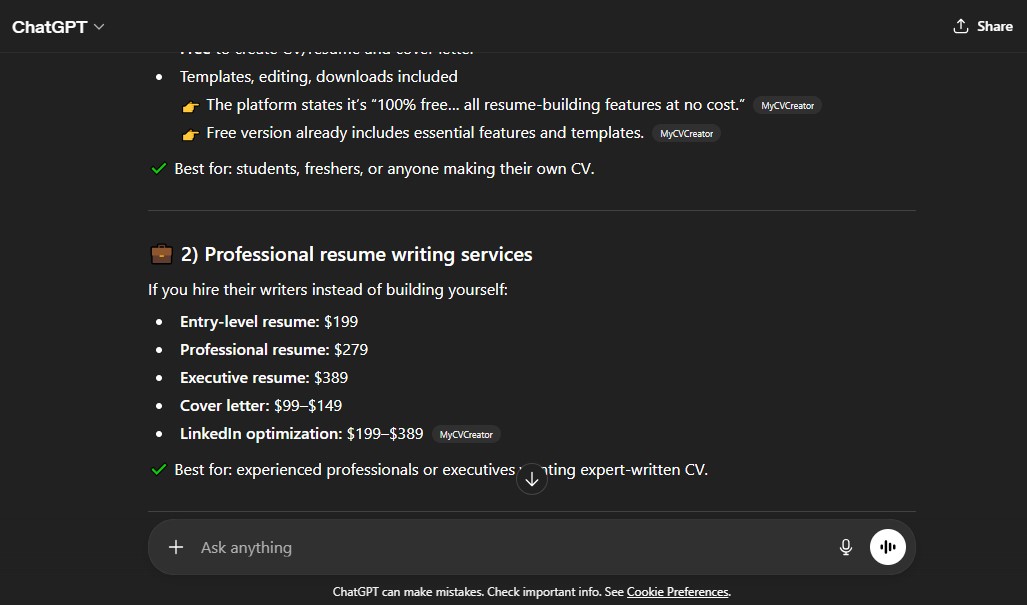
Alright, let’s get into it. MyCVCreator’s pricing is actually a little confusing and honestly, not super clear upfront. They call themselves “free forever,” but there’s a bunch of stuff they don’t spell out-and if you don’t pay attention, it’s easy to get hit by costs you didn’t expect.
"Free Forever" Web App Plan ($0... Kinda)
-
So, on the website they say it's 100% free forever-no hidden costs. But from what I’ve seen and used myself, a lot of important stuff (like AI writing help) actually isn’t free unless you bring your own OpenAI API key… which you have to pay for separately.
-
There’s no real pricing page that tells you what you get for free and what you might have to pay for, so you end up guessing or finding out the hard way.
-
I’ve had friends start building a resume, only to hit a wall when trying to use AI features and realize they needed to set up a paid OpenAI account. That’s not cool. It feels like “free” but you still need to pay if you want the goodies.
AI Writing Features (OpenAI API Key Needed, Real Cost Hidden)
-
Here’s where it gets tricky: If you want to use the AI writing features (like automatic bullet points or rewriting sections), you have to connect your own paid OpenAI API key. The price for the API key depends on how much you use it, but it’s definitely not free and there’s no estimate given anywhere in MyCVCreator.
-
In my own experience, this can add up, especially if you end up tweaking your resume a bunch. Even if it looks like pennies per use, it racks up fast, and it’s something MyCVCreator never warns you about so you can’t budget for it.
-
Not being upfront about this cost means you could get surprised with charges from OpenAI just for using a “free” resume tool.
Self-Hosting Plan (Not Really Free: You Pay for Everything Else)
-
MyCVCreator advertises that you can self-host the app for free. But that just means you have to pay for all the stuff yourself: server or VPS (usually $5–$15 every month), a domain name ($1–$2 monthly), and even email services (could be another $0–$5).
-
They don’t explain any of these costs anywhere. If you add them up, you’re easily spending $6–$20 every month just to run the thing yourself. That’s definitely not what most people expect when they see “free forever.”
-
Plus, you’re in charge of maintenance, updates, and all the tech-y backend stuff. Honestly, who has time for that? I’d rather spend my energy on my resume than on server problems.
Honestly, MyCVCreator looks free on the surface but that’s only until you dig deeper. You end up having to pay every month for things like credits, infrastructure, and AI features-sometimes for stuff you don’t even use-and there’s no clear breakdown to help you decide what you’re actually paying for. I’d rather know upfront what my costs are so I’m not left guessing or getting hit with random bills.
Why You Really Should Try ResumeJudge Instead
-
If you want a tool where you can actually see what you get (and what it costs), ResumeJudge just makes sense. It’s got all the stuff MyCVCreator hides-real ATS scanning, keyword gap analysis, resume optimization, ATS-friendly templates, and even an auto-applier if you’re job hunting for real.
-
The best part? You only pay once-no monthly fees, no sneaky charges, no expiring credits. $14 gets you 50 scans and you use them whenever you want. I love this because I only pay when I need to, not every month whether I use it or not.
-
I’ve found the feedback way better and more honest over there, and you can read all the details right on ResumeJudge’s pricing page-they actually show you what you get, no surprises.
If you want to see how MyCVCreator stacks up against ResumeJudge, check out the breakdown below.
What are some MyCVCreator alternatives?
MyCVCreator Alternatives
 ResumeJudge
 MyPerfectResume
 ResumeIO
Alright, so you’ve seen what MyCVCreator can do. But before you jump in, let’s check out some other options. Here’s the top pick you should know about:
#1 - MyCVCreator vs ResumeJudge
-
What’s the same: Both MyCVCreator and ResumeJudge help you make a resume fast, with templates and step-by-step help so you don’t get stuck.
-
Why ResumeJudge is better:
- Real ATS checks, not just looks. ResumeJudge actually scans your resume like the robots companies use (those are called ATS). It tells you what’s missing, what’s wrong, and how to fix it so you don’t get skipped over.
- One-click job matching. You can paste in the job you want, and ResumeJudge will fix your resume for you in one click. It adds the right words and skills, so you don’t have to guess what to write.
- Templates that work everywhere. Their templates look good and are made to work with those company robots, so you don’t have to worry about your resume getting lost.
- Pay once, use forever. You buy credits one time, and they never expire. No sneaky subscriptions or losing stuff you paid for.
- Helpful support. If you get stuck, ResumeJudge actually helps you out. No robots or endless waiting.
-
Where is MyCVCreator better?
- Totally free and open-source. If you want something 100% free and don’t care about fancy features, MyCVCreator is simple and costs nothing. But if you want your resume to actually get noticed by companies, ResumeJudge is way more powerful.
#2 - MyCVCreator vs MyPerfectResume
-
What’s the same: MyCVCreator and MyPerfectResume both help you make a resume online using templates, step-by-step directions, and even some AI features if you want them. They both spit out your resume in files you can use, like PDF.
-
Where MyPerfectResume is better:
- Extra help and feedback: Gives tips, smart suggestions, and even reviews your resume to make it sound sharper.
- More career tools: Has stuff like online profiles and interview help you won’t really find on MyCVCreator.
- More design choices: There are more ways to make your resume look fancy or different, so you get more styles to pick from.
-
Where MyCVCreator is better:
- Totally free and open-source: There’s nothing to pay for - not for templates, not for exporting, not even for using it by yourself. If you don’t wanna spend, MyCVCreator’s got your back.
- Super simple: The builder is really easy to figure out and walks you through every step, so you won’t get lost.
If you like things simple and free, MyCVCreator might be your thing. But if you want more designs and built-in resume tips, MyPerfectResume has a few extra tricks.
#3 - MyCVCreator vs ResumeIO
-
What’s the same: Both MyCVCreator and Resume.io are tools you use on your computer (nothing to download) to build a resume when you’re hunting for a job. Both have easy templates, can guide you step-by-step, and let you save or print your resume as a PDF.
-
Where Resume.io is better:
- Way more polish and features: Resume.io has fancier templates, lots of extras like analytics, and better customer support if you get stuck.
- Easier downloads for free (at first): They let you try most things for free, and it’s simple to get started. Plus, you don’t have to mess with API keys or techy stuff.
-
Where MyCVCreator is better:
- It’s totally free (seriously, no tricks): MyCVCreator is open-source and doesn’t charge for any of its features or templates. No sneaky subscriptions!
- Super easy to use: I find the site isn’t cluttered; if you want simple and basic, you get exactly that without getting lost.
So if you want something shiny with lots of bells and whistles, Resume.io probably makes sense. But if you don’t want to pay and really just want a no-fuss resume builder, MyCVCreator is an easy pick.
Is MyCVCreator Worth It?

Short answer – Honestly, NOT REALLY!
Here's why I wouldn't recommend it:
-
Reason #1: Awful Customer Service: Trying to get a refund or just cancel your plan is a nightmare. The support team is barely there when you need help, so good luck if something goes wrong.
-
Reason #2: Sneaky Subscriptions & Lost Credits: MyCVCreator locks you into expensive subscriptions, and to make it worse, any credits you don’t use just disappear every month. So you’re literally paying for stuff you never even get to use.
-
Reason #3: Barely Any Value in the Free Plan: The free version is really just a tease-you hardly get anything useful unless you pay, so it’s kind of pointless if you’re hoping to build a solid resume for free.
Here's a review by an Anonymous author discussing MyCVCreator's shortcomings:
"Competitors like Zety offer tools “which mycvcreator lacks."
― Anonymous
So, what should you do instead?
Look, after messing around with MyCVCreator and bumping into all these weird issues, I went hunting for a better way.
That’s where ResumeJudge changed the game for me. Here’s the scoop:

First off, you get a real free trial-10 full resume scans, no tricks. But the cooler part?
-
#1 It Actually Customizes to YOU: ResumeJudge doesn’t do that boring “one-template-fits-all” thing. It understands if you’re fresh out of school, midway through your career, or a total specialist, and switches up its resume tips and keywords so it actually matches who you are and what you’re trying to get hired for.
-
#2 Credits NEVER Vanish: Once you buy credits here, they just sit in your account forever until you use them. No more wasted money on disappearing credits or tricky subscriptions.
-
#3 Support That Actually Replies: It’s a small team and they really care-every time I needed help, I got a straight-up answer in less than half a day, which is way better than the nonsense I dealt with at MyCVCreator.
-
#4 Built by Real Pros for Real Jobs: ResumeJudge was made by folks who actually know how those resume robots (ATS) work. Instead of just handing you a nice looking document, it makes sure your resume has the right keywords, the best bullet points, and passes the systems that recruiters actually use to filter through resumes.
So yeah, this is it from my side. Hope I saved you some time (and money) figuring out if MyCVCreator’s for you. If you want to try ResumeJudge, just head over to the website or go straight for your 10-scan free trial. No card, no phone number, just your email. Give it a shot!
Share this article:
Ready to optimize your resume?
Use ResumeJudge to scan your resume against any job description and discover what's holding you back.
Free to use • No credit card required