JobForm Automator Review: I Tried it for 14 Days - Here's What I Found [3 Pros, 5 Cons]
In This Guide:
Read this article if...
you’ve been eyeing JobForm Automator and can’t decide if it’s worth the hype. I went deep to figure out what’s good, what’s not, and everything in between in this JobForm Automator review.
I’ll share exactly 3 things JobForm Automator does right and point out the 5 big mistakes it makes-nothing sugarcoated.
Naturally, you probably want to know about the pricing. I've got you covered, including the fine print on what JobForm Automator actually costs.
If you’re on the hunt for alternatives, yes, you’ll find those here too. And I won’t leave you hanging-I’ll answer the real question: Is JobForm Automator legit?
Don’t just skim this and move on. I’ve spent actual hours using JobForm Automator, reading user rants, and comparing features, so you get the real scoop.
You’ll seriously miss a ton if you skip this blog. Every little detail is in here.
Make yourself comfy, maybe get a snack, and let’s jump right in.
PS: The table of contents is ready on the side. Feel free to skip straight to whatever catches your eye!

JobForm Automator Review Summary
JobForm Automator Review Summary


If you're in a rush, here's a quick 2-minute summary of this blog:
3 Things JobForm Automator Does Well
-
Easy to Use: People talk about how you don’t need to be super tech-savvy; you just open it and get going pretty quick.
-
Simplifies Job Hunting: Some users say it makes hunting for jobs less stressful because it organizes things you’d normally do by hand.
-
Chrome Extension: It works as a browser extension, so you don’t have to juggle different apps or tabs while using it. However, some reviews mention issues like expensive pricing or less-than-stellar customer support, as noted in the cons section.
-
More on the shiny side of JobForm Automator below.
5 Worst Things About JobForm Automator
-
Terrible Customer Service & Refund Hassle: You’ll have a super hard time getting help if something goes wrong. Refunds and even canceling your account can be a huge headache.
-
Expensive Subscriptions with Expiring Credits: You have to pay a lot, and if you don’t use all your monthly credits, they just disappear. There’s no rolling over, so you’re paying for more than you use.
-
Only Works with Limited Job Types: It really only works on those ‘Easy Apply’ jobs. If you’re hoping to use it for more, you’re out of luck.
-
Messy, Unreliable Answers: The tool doesn’t get the context right. Sometimes it just fills in random answers or even leaves stuff blank, which can mess up your applications.
-
Bugs and Glitches Everywhere: Get ready for crashes and weird hiccups. There are tons of bugs, and it just doesn’t feel stable or smooth to use.
-
Wanna see more about JobForm Automator’s problems? Click here.
How Much Does JobForm Automator Cost?
-
Basic (Starter) Plan – Totally free, so you can try auto-applying to 10 jobs a day, use the AI resume builder, and see if you even like it. Nice for just checking things out, but super limited.
-
Premium Plan – Costs around $20 (about ₹1,600) a month. Lets you apply to up to 300 jobs a day and send around 100 AI emails. It’s got better resume help, but honestly, $20 feels a bit expensive if you aren’t job hunting full-time.
-
Diamond Plan – Priced between $50–$99 (₹4,000–₹8,000), this is for folks going all-out with job hunting. You get 1,000+ recruiter emails, fancy automation features, and priority support. Pretty powerful, but it can get kinda pricey, especially on the higher end.
-
Should you buy JobForm Automator? The free plan’s cool for testing, but the paid ones are a bit steep and only worth it if you’re applying like crazy. More details on what it costs down here.
JobForm Automator Review - What Does it Get Right?
JobForm Automator Pros
Here are 3 things people seem to dig about JobForm Automator:
-
Easy to Use:
- You don’t need to be a tech whiz; folks mention they just open it and start using it right away.
- Even if you’re not great with computers, you figure it out pretty fast.
- Some say they like not having to waste time learning complicated steps, but others feel a little lost if they get stuck-see the cons for that.
-
Simplifies Job Hunting:
- People keep saying it takes the stress out of searching and applying for jobs.
- It organizes stuff you’d usually do by hand, so you don’t have to make your own spreadsheets or notes.
- You just handle everything in one spot, and that feels less overwhelming.
-
Chrome Extension:
- Users like that it works right in your browser, so you don’t need extra apps open.
- You just click the extension, and you’re basically ready to roll while browsing job sites.
- Some say it helps them not lose track of where they’re at, since it’s always there in Chrome.
Here's a user talking about their experience on the platform:
"its good platform"
― Narendra, 11 Nov 2024
5 Worst Things About JobForm Automator
JobForm Automator Cons
Alright, so let’s break down the 5 things that JobForm Automator really gets wrong and why people can’t stand them:
-
Terrible Customer Service & Refund Hassle:
- When you run into a problem or want a refund, it’s almost impossible to get straight answers or actual help from them.
- You can spend ages just trying to cancel your account and end up getting charged for stuff you don’t even use.
- Based on my own headaches, you’re basically on your own if anything goes sideways here.
-
Expensive Subscriptions with Expiring Credits:
- You pay a whole lot every month, but if you don’t use your credits, they’re gone. There’s no way to roll them over to the next month.
- It sucks because you’re wasting money whether you use the full service or not, especially if you forget or get busy.
- If you’re thinking of paying for the year to get more value, don’t bother-credits still disappear month to month.
Here's a review by Alex Smith expressing dissatisfaction:
"Stay away! this is garbage"
― Alex Smith
-
Only Works with Limited Job Types:
- It only works on “Easy Apply” roles, so if you want to use it on anything else, you’re just out of luck.
- There’s no way to get around these limits, and it’s seriously annoying if you’re applying to lots of jobs.
- Even with AI, there’s no option for it to fill in extra questions or adapt to other application types.
-
Messy, Unreliable Answers:
- This thing just doesn’t get your context right. Sometimes it writes totally random stuff, or just puts ‘0’ and leaves fields empty.
- That means your job apps can look silly or incomplete, and it can even mess up your chances of getting hired.
- From my own tests, I notice it’s just not smart enough to handle complex forms or questions, which is a big letdown.
-
Bugs and Glitches Everywhere:
- Get ready for the app to crash a lot or do weird things that make you start over. Users keep running into technical problems.
- It feels messy and not reliable at all, and that's super frustrating when you're in a rush.
- Even the support team, when they do help, can’t fix everything because these bugs keep popping up.
Here's a review by Pranay Mishra discussing the limitations of the software:
"Works only on Easy apply roles with no control, can't utilize AI to generate data for question. Doesn't understand the context so answers 0 in most of the field thereby jeopardizing the whole application."
― Pranay Mishra (28 Feb 2025)
By the way, if you're searching for a service that lets you purchase credits without forcing you into a subscription-and where your credits last forever-check out ResumeJudge. You can even test it out for free with up to 10 scans by visiting this link.
This concludes the in-depth review. Interested in exploring more JobForm Automator competitors? But first, let’s discuss its pricing structure!
What Does JobForm Automator Cost?
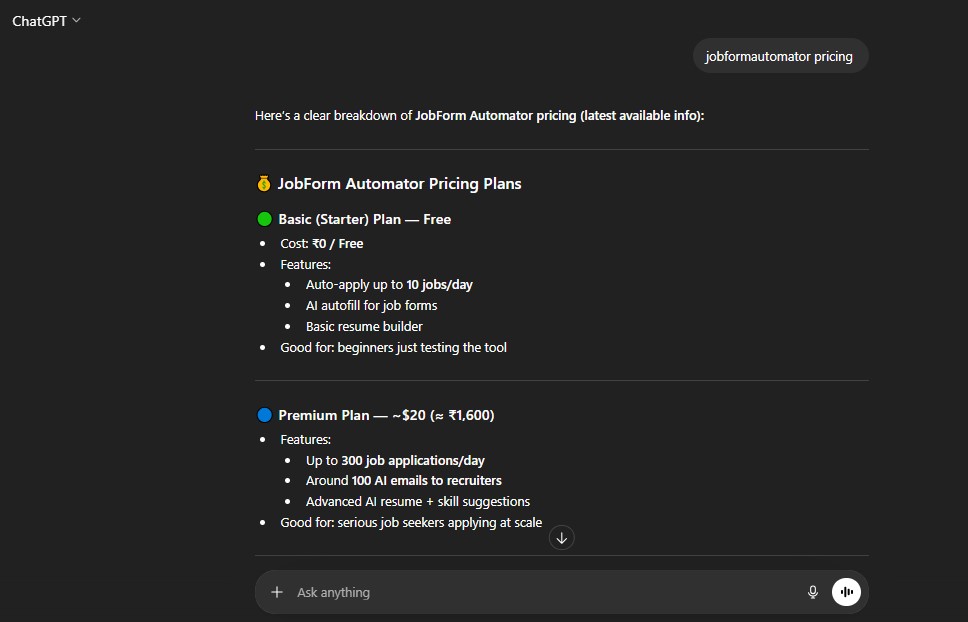
JobForm Automator makes it really tough to figure out what you’re actually paying for. The prices are all over the place and there’s no single page that tells you straight-up what each plan costs and what you get. I’ve dug up the most accurate info I could, and here’s the breakdown-plus, let’s talk about why you might just want to skip this tool altogether:
Basic Plan (Free)
-
So, technically there’s a free plan, but all you get is auto-applying to about 10 jobs a day, super basic resume tools, and you can’t even access the advanced stuff that the app shouts about. It’s basically just a demo-good to poke around but you’ll outgrow it in one afternoon.
-
They make it sound like you get to “try for free,” but honestly, it’s so limited it’s not enough to actually get a job.
-
And hey, you’re gonna get prompted for upgrades instantly, so the “free” part is just to get you in the door.
Premium Plan (~$20/month)
-
Alright, here’s where they actually want your cash: you pay about $20 every single month. That gets you maybe 300 job applications per day, some basic AI resume tips, and recruiter emails.
-
But these credits reset every month. So, if you don’t use up your job apps, you just lose them-and you have to pay again next month, no matter what. Honestly, feels like you’re getting charged rent for nothing if you take a break for a week.
-
If you’re hoping for serious resume optimization or real, targeted job help-nope, it’s still just about blasting out applications and hoping.
Diamond Plan ($50–$99/month, Unclear Pricing)
-
Here’s where it gets really sketchy: some sites say Diamond is $50 a month, others claim it’ll cost you $99. The official site won’t even tell you straight-up what you’ll pay before you enter your credit card.
-
For all that cash, you get “priority support,” more recruiter emails, skill gap analysis, and “advanced automation”-which, from my own use, isn’t much more than just spamming out even more generic apps.
-
The price changes based on who you ask, and there’s no guarantee how long a “month” even lasts or what the refund policy is. Super risky move if you ask me. I’d never drop that much on something this vague.
Here’s the thing that’s just wild to me:
-
They never tell you if it’s monthly or lifetime-which means you’re almost definitely stuck with a monthly fee, even if you don’t use the tool much that month.
-
There’s no real refund guarantee, and no clear billing info. When you see this much vagueness, it’s usually a red flag. In my experience, tools like JobCopilot or Simplify make exactly what you’re paying for super clear, and you know what you get every month.
-
JobForm Automator just feels like you’re being hustled into an ongoing subscription, paying endlessly for credits whether or not you ever really use them. Plus, there’s always a chance they’ll change the price on you with no warning.
Now, if you want actually good value for your money...
Why I Recommend ResumeJudge Instead
-
With ResumeJudge, you pay a simple, one-time $14 for 50 scans that never expire. No more monthly surprises-use your credits whenever you want, forever.
-
The focus isn’t just mass applying: ResumeJudge optimizes your resume for each specific job using proven ATS-scoring, keyword checks, and smart suggestions so you actually land interviews-not just spam recruiters.
-
I’ve tried it myself: resume builder, scanner, personalized cover letters-everything’s included, and it’s super easy to use. No weird surprise charges or random price hikes.
-
So, for less than the cost of one month of JobForm Automator’s “Premium” or “Diamond” (which might not even be the same price next week), you get a toolbox that doesn’t gatekeep features and you actually know what you’re paying for. Seems like a no-brainer to me.
If you want a side-by-side breakdown of JobForm Automator and ResumeJudge, scroll down to the section below.
What are some JobForm Automator alternatives?
JobForm Automator Alternatives
 ResumeJudge
 LazyApply
 JobCopilot
Alright, so you’ve seen what JobForm Automator can (and can’t) do. But before you jump in, let’s check out some other options. Here’s the top pick you should know about:
#1 - JobForm Automator vs ResumeJudge
-
What’s the same: Both JobForm Automator and ResumeJudge are here to make job hunting less of a pain. They both try to save you time and help you get more interviews, just in different ways.
-
Why ResumeJudge is better:
- Real resume fixing, not just form filling. ResumeJudge actually checks your resume like those robot systems (ATS) that companies use. It tells you what’s missing, what’s wrong, and how to fix it so you actually get noticed. JobForm Automator just fills out forms-it doesn’t really help your resume stand out.
- One-click resume upgrades for every job. With ResumeJudge, you can copy-paste any job description and it’ll instantly tweak your resume to match that job. No more sending the same boring resume everywhere.
- All the tools in one spot. ResumeJudge gives you resume scans, keyword checks, LinkedIn help, and even auto-apply features-all in one place. JobForm Automator is mostly just about auto-applying.
- Buy credits once, use them whenever. ResumeJudge lets you buy credits that never expire. So you can use them whenever you want, no rush. With JobForm Automator, you pay every month and if you don’t use your credits, they’re gone.
- Support that actually helps. People say ResumeJudge’s support is friendly and quick. JobForm Automator? Not so much-lots of folks complain about slow or no help at all.
-
Where is JobForm Automator better?
- Bulk applying: If you just want to blast out a ton of applications super fast, JobForm Automator can do that. But honestly, if you want real results and not just numbers, ResumeJudge is the smarter pick.
If you want a tool that actually helps you get interviews (not just send out a bunch of apps), I’d go with ResumeJudge. It’s way more helpful, and you don’t have to worry about wasted credits or bad support.
#2 - JobForm Automator vs LazyApply
-
What’s the same: Both JobForm Automator and LazyApply are tools made to help you blast out job applications fast, no more boring copy-paste or typing in the same stuff 50 times a day. Just click, fill, and send – on autopilot (mostly on ‘Easy Apply’ jobs).
-
Where LazyApply is better:
- Fires off way more apps: LazyApply is a beast if you want to apply to like 1,000 places at once. It’s all about that numbers game-you tell it where, and it’ll do the rest, super quick.
- Less headache, simpler setup: It’s super easy to get started. Pop in the Chrome extension, answer a couple questions, and you’re off. No fuss, no confusing menus.
-
Where JobForm Automator is better:
- Smoother to start with: JobForm Automator doesn’t make you feel lost-if you know how to use a browser, you’ll figure this out in no time.
- Keeps things tidier: Instead of opening up 10 different sites or tools, it keeps everything inside your browser. Job hunting feels a little less all over the place.
#3 - JobForm Automator vs JobCopilot
-
What’s the same: Both JobForm Automator and JobCopilot are built to help you breeze through job applications with less clicking and copy-pasting. They use AI to speed things up, so you spend less time filling in boring forms and more time relaxing (or job-hunting smarter).
-
Where JobCopilot is better:
- Bigger all-in-one package: JobCopilot feels more like your job search command center. You can find jobs, fix your resume and cover letter, and track stuff all in one cozy place.
- Control freak’s dream: If you’re picky about which jobs you want, JobCopilot gives you more filters and lets you really fine-tune what you apply for, so you don’t end up spamming a bunch of random companies.
-
Where JobForm Automator is better:
- Really easy to use: You barely have to set it up. Just add the Chrome extension, and you’re already rolling.
- Perfect for quick wins: If you’re just starting out or want to test auto-applying without paying, the free plan lets you dip your toes in with no risk.
-
Pricing: JobCopilot has a $29/month plan, which includes unlimited apps, resume tools, and even a custom domain for cold outreach (which sounds super pro but maybe too much if you only need something simple). JobForm Automator, on the other hand, starts free but charges $20–$99/month for more power and features; definitely check how many jobs you need to apply to before dropping that kind of money.
-
Final simple take: Go for JobCopilot if you want one main hub for all your job stuff and you like being in control. Try JobForm Automator if you want an easy, no-fuss way to blast through job apps super fast, especially if you don’t want to spend a ton right away.
Is JobForm Automator Worth It?

Short answer – Nope, not really!
Here’s why:
-
Reason #1: Awful Customer Service: If you run into any issues, good luck getting help. Trying to get a refund or even cancel is super annoying and takes forever.
-
Reason #2: Pricey Subscriptions & Vanishing Credits: You pay a pretty hefty fee for their plans, but if you don't use all your credits by the end of the month, they just disappear. No rollovers, so you basically lose what you paid for.
-
Reason #3: Only Works on Certain Jobs & Messes Up Applications: It only helps with “Easy Apply” jobs-not all job types. Plus, the tool can spit out random or blank answers that make your applications look really bad. And don’t even get me started on the bugs and random crashes.
Here's a review by Mahaboob linux talking about their experience:
"So many bugs, need to fix, but team support is good."
― Mahaboob linux (28 Nov 2024)
So what should you use instead?
Honestly, I think ResumeJudge totally fixes everything that JobForm Automator gets wrong. Here’s how:

For starters, you actually get a real free trial with 10 scans-no strings attached. But the best part is:
-
#1 It’s Actually Smart About Applications - It Knows Who You Are And What You’re Applying For: ResumeJudge isn’t just dumping your resume out there. Whether you’re a student, new to the job market, or super experienced, it tweaks your resume, cover letter, and application strategy for the exact job and level you’re targeting. That way, every auto-apply is actually customized, not some janky copy-paste.
-
#2 Credits NEVER EXPIRE: When you buy credits, they’re yours forever. Seriously. No monthly “use it or lose it” nonsense.
-
#3 Support That Doesn’t Leave You Hanging: I've never had to wait more than a few hours to get a real answer from the ResumeJudge crew. They actually care and help you out quickly.
-
#4 Built by People Who Get How Job Applications Work: The team behind ResumeJudge built tools that do everything in one spot-resume scanning, ATS scoring, skill syncing, cover letters, and auto-application-all designed by folks who know exactly how automated hiring systems reject people. No more juggling a bunch of tools or getting randomly filtered out.
That’s pretty much everything I’ve learned about JobForm Automator, plus a better option that I actually trust. If you want to see ResumeJudge for yourself, head to our website or kick off your 10-scan free trial. You don’t need a credit card or phone number-just drop in your email and see if it’s what you’ve been looking for.
Share this article:
Ready to optimize your resume?
Use ResumeJudge to scan your resume against any job description and discover what's holding you back.
Free to use • No credit card required