CVWizard Review: I Tried it for 14 Days - Here's What I Found [3 Pros, 5 Cons]
In This Guide:
Read this article if...
you're thinking about trying CVWizard and want the real scoop. Yep, this CVWizard review is straight from someone who's actually taken it for a spin.
I’ll spill the beans on the 3 things CVWizard does super well-and trust me, there are surprises.
I’ll also be honest about the 5 big mistakes CVWizard makes. Some of these could totally change your mind about using it.
Worried about cost? I’ll break down exactly what you’ll pay (and if it’s actually worth it).
Curious about what’s better out there? I’ll walk you through some top CVWizard alternatives too.
And let’s not forget-everyone wants to know: Is CVWizard even legit? I’ll answer this with zero fluff.
If you just skip this post, you might miss some game-changing info that’ll save you time, money, and headaches.
So hang tight-I've tested everything and sifted through tons of feedback so you don’t have to.
Grab a snack and get comfy, because all your CVWizard questions are about to be answered.
P.S. There’s a handy table of contents so you can jump right to what you care about.

CVWizard Review Summary
CVWizard Review Summary

If you're in a rush, here's a quick 2-minute summary of this blog:
3 Things CVWizard Does Well
-
Simple User Interface: You’ll notice the tool looks pretty straightforward, which makes it kind of easy to find your way around without getting stuck.
-
Helpful Templates: There are a bunch of ready-made templates, so you can pick one that fits your job goal and not worry too much about layout stuff.
-
Step-by-Step Guidance: The tool kind of walks you through each section, so you don’t have to guess what to write next while working on your CV. (However, some users wish there was more support when issues do come up - see cons section.)
-
More on what CVWizard gets right below.
5 Big Mistakes CVWizard Makes
-
Customer Service is Useless: If you ever run into a problem or want a refund, good luck getting help. It feels like they just ignore your emails and never make things right.
-
Sneaky Subscriptions are Costly: They lock you into pricey subscriptions, and what's worse-any credits you don't use by month end just vanish, so you end up paying for stuff you never get.
-
Not Really Free: They let you build your CV thinking it’s free, but when you try to download, surprise! You have to pay, after spending all that time.
-
Charges Without Warning: They take money from your account every month, even if you don’t use the site, and don’t make it clear when you first sign up.
-
Hard to Cancel: Trying to stop your subscription feels like a headache-lots of users say canceling just doesn’t work, and the charges keep coming anyway.
-
Details on the dark side of CVWizard below.
What Does CVWizard Cost?
-
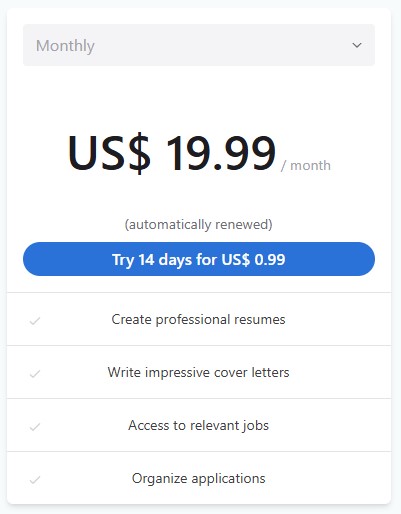
14-Day Trial – You can try out everything for 14 days, and it only costs $0.99. It's super cheap to see if it works for you, but remember it ends quick.
-
Monthly Plan – For $19.99 each month, you get all the features without limits-like making lots of resumes and cover letters. But honestly, it's kinda pricey, especially if you only need a resume now and then.
-
Should you buy CVWizard? I’d say no, unless you’re job-hunting a lot. For most folks, it's a bit expensive for what you get. More details about its cost below.
CVWizard Review - What Does it Get Right?
CVWizard Pros
Here are 3 things people usually talk about when using CVWizard:
-
Simple user interface:
- You can easily find everything you need without feeling lost or confused.
- A lot of people say it feels beginner-friendly, so you don’t need special tech skills.
- The layout is pretty clean, but if you ever need help, sometimes support is slow-check the cons section for more on that.
-
Helpful templates:
- You get a bunch of ready-made templates that work for many different job types.
- People find the designs modern and the templates make the CV look polished without much effort.
- It lets you quickly edit text and the system even suggests words for different CV sections.
-
Step-by-step guidance:
- The tool actually walks you through each part, so you always know what to write next.
- There are helpful tips as you fill out your CV, which people find useful, especially if you’re not sure what to include.
- Building a professional CV feels much easier because you don’t have to think too much about structure.
Here's a user talking about how helpful the resume support tool is:
"Itś a great support to Made a resume. Itś a great support to Made a resume, only I can´t change letter size."
― Juan Colorado MX
5 Big Mistakes CVWizard Makes
CVWizard Cons
Let’s dig deep into the worst five things about CVWizard, so you know exactly what you’re getting into:
-
Customer Service is Useless
- When you reach out for help because they charged you or you want a refund, they just ignore your emails for weeks.
- Even if you ask nicely and explain everything, don't expect them to make things right or answer fast.
- From my time using it, getting any real help from support feels impossible-they just aren't around.
-
Sneaky Subscriptions are Costly
- They sign you up for pricey plans, and you probably won’t even notice until your money's gone.
- If you forget to use your credits, you lose them-they simply vanish every month, so you pay for nothing.
- I’ve lost money just because I didn’t use all the credits in time-the system isn’t fair to users at all.
Here's a review by Thelma john Ugen IT regarding their refund experience:
"Refund me my money please I used this app just to create my cv and I paid €2 for it, I didn’t know that they would automatically take €19.99 money from my account the next month and I haven’t used this app for weeks now, I’ve sent emails to them to refund me back my money but they aren’t responding to my request. REFUND MY MONEY"
― Thelma john Ugen IT
-
Not Really Free
- You spend a ton of time building your CV, thinking it's all free, but when you try to download, they make you pay.
- A lot of users get mad after putting in hours, only to get hit with a “paywall” at the last step.
- It’s super frustrating because they don’t warn you early on-only after you’ve done the work.
-
Charges Without Warning
- They take money from your account every month, even when you stop using the tool.
- When you buy a cheap plan, you don’t realize it turns into a full monthly subscription that costs way more.
- Many people, including me, never get a clear heads-up about these charges-it feels sneaky.
-
Hard to Cancel
- Trying to cancel the subscription is a huge pain, and a lot of people keep getting charged after cancelling.
- Even after you email support, the charges sometimes just keep coming, and your account stays active.
- Sadly, I’ve seen tons of people call it a “scam” just because canceling is so tricky and draining.
Here's a review by Anton Daniel MD expressing concerns about their subscription billing:
"They are some scammers. When you buy the $0.99 pack, they take money from your account every month without telling you, just scammers. And when you ask for the money back, they can’t give it to you."
― Anton Daniel MD
By the way, if you're searching for a platform that lets you keep your credits forever and doesn't force you into a subscription, check out ResumeJudge. You even get up to 10 complimentary scans to test it out at this link.
That wraps up this in-depth review. Curious about some other CVWizard alternatives? But first, let’s take a look at the pricing details!
What Does CVWizard Cost?
So, you might be thinking about using CVWizard to make your resume. Let me break down exactly what you get-and pay-for, because from what I’ve seen and experienced, it’s not as simple or affordable as it looks.
The “Unlimited” Monthly Plan ($19.99/month)
-
For almost $20 every single month, you get access to all of CVWizard’s features-resume builder, cover letter maker, job listings, and so on. But here’s the catch: they automatically charge you every month, even if you don’t touch your account at all.
-
You get “unlimited” use, but since most people only need a resume update a couple times a year, you end up paying for a bunch of months you don’t actually use. I tried it myself, and unless you’re a serial job hopper, it just feels wasteful.
-
Also, there’s no real flexibility. Your access is tied to the subscription, so if you ever cancel or stop paying, you’re locked out and stuck. Every month you pay, it’s only for that month-there’s nothing left over if you skip a month or two.
14-Day Trial ($0.99)
-
They offer a 14-day trial for $0.99, which sounds good at first, but after that, they auto-upgrade you to the full $19.99/month unless you remember to cancel. I personally find that sneaky-easy to forget, and suddenly your card’s getting charged.
-
The trial gives you access to all their features, but let’s be real: Who’s building and sending off a dozen resumes and cover letters in just two weeks? You’ll almost never use it enough to get your money's worth before it renews.
-
In my experience, these types of trials are set up so you fall into the recurring payment trap. Miss that cancel date, and you’ve already paid for something you might not even need.
Let’s be honest-CVWizard looks flashy, but at the end of the day you’re paying the same hefty fee every month, even if you don’t use it. That’s money down the drain, and if you ever stop, you lose access to everything. That just doesn’t make sense, especially if you only update your resume a couple times a year or even less.
If you want a smarter option, I really recommend checking out ResumeJudge:
-
It does way more than just build a resume. You get full ATS scanning and optimization, real scoring, keyword analysis, and even ATS-friendly templates-all for a one-time payment starting at just $14.
-
And the best part? No subscriptions, your credits never expire. You can use your 50 scans whenever you want-today, next year, whenever. No “monthly” nonsense or getting locked out for missing a payment.
-
I love that you can optimize and fine-tune your resume as many times as you need for a price cheaper than just one month of CVWizard. It’s just smarter and way more flexible-and you actually own what you pay for.
If you want to see a deep dive comparing CVWizard and ResumeJudge, check the next section below.
What are some CVWizard alternatives?
CVWizard Alternatives
 ResumeJudge
 ResumeIO
 MyPerfectResume
So you’ve seen what CVWizard can do, but before you jump in, let’s check out some other options. Here’s the one I think you should really look at:
#1 - CVWizard vs ResumeJudge
-
What’s the same: Both CVWizard and ResumeJudge help you build a resume with templates and step-by-step help, so you don’t have to start from scratch or worry about making it look good.
-
Why ResumeJudge is better:
- Real ATS checks, not just looks. ResumeJudge actually scans your resume like those hiring robots (ATS) do, so you know if your resume will get seen by a real person or just tossed out.
- One-click fixes for your resume. You can paste in the job you want, and ResumeJudge will instantly tweak your resume to fit - no guessing, no hours of editing.
- No sneaky subscriptions. You just buy credits once, and they never expire. No monthly charges, no surprise bills, and you only pay for what you use.
- Super helpful support. If you get stuck, ResumeJudge actually answers and helps you out, instead of ignoring you like some other sites.
- Templates that work with real hiring systems. Their designs look good and are made to get past those resume robots, so you don’t get blocked just because of a fancy font.
-
Where CVWizard is better:
- Simple to use and lots of templates: If you just want something super basic and quick, CVWizard’s interface is easy to figure out and has a bunch of templates to pick from.
But honestly? If you want your resume to actually get seen and not just look pretty, ResumeJudge is the way to go. You don’t have to worry about hidden fees or your credits disappearing, and you get real help that makes a difference.
#2 - CVWizard vs ResumeIO
-
What’s the same: Both CVWizard and Resume.io are super easy tools online for making your next resume. They use ready-to-go templates, guide you through building each section, and let you download your resume when you're done (after paying). Both are cool if you want something fast without messing with layouts yourself.
-
Where Resume.io is better:
- Easier on your wallet: Resume.io's monthly plan is cheaper ($2.95/first 7 days, then $24.95/month) and doesn't try to sneak up on you with weird charges or hidden subscriptions like CVWizard sometimes does.
- Better support + more templates: Resume.io actually answers support requests pretty quick, and you get a good mix of clean, modern templates. So, if you get stuck or need help, you'll have a better time.
-
Where CVWizard is better:
- Really simple to use: I think CVWizard is super easy to figure out, even if you've never built a resume before. If you're looking for something where you just follow the steps, it's honestly not bad.
#3 - CVWizard vs MyPerfectResume
-
What’s the same: Both CVWizard and MyPerfectResume are online tools that let you make your own resume using cool templates and step-by-step help. You can put in your info, and the website does most of the arranging for you.
-
Where MyPerfectResume is better:
- Smarter suggestions: MyPerfectResume gives you built-in writing help, quick tips, and even checks your resume with AI so it sounds just right.
- Extra job tools: You get practice for interviews, plus options to make an online resume link to share with jobs.
- More ways to make it your own: There are more templates and fancy layouts to choose from if you want your resume to look a certain way.
-
Where CVWizard is better:
- Super simple to use: Honestly, CVWizard’s site is a breeze. If you want something easy where you don’t have to click around a lot, this one keeps things basic.
-
Bottom line: If you really want tons of design options and smart guidance, MyPerfectResume just has more cool stuff. But if you just need to make a resume fast and don’t want to mess with complicated menus, CVWizard keeps it simple (just watch out for sneaky subscriptions).
Is CVWizard Worth It?

Short answer - Nope, definitely not!
Here's why:
-
Reason #1: Customer Service Is Basically MIA: If you get stuck or want your money back, it's almost impossible. I’ve found that they barely ever reply, and most people just get ignored.
-
Reason #2: Sneaky and Expensive Subscriptions: They pull you into paying every month, and any credits you don’t use? Poof, they're gone forever at the end of the month. So you’re just losing money for no reason.
-
Reason #3: Super Hard to Cancel-And Not Actually Free: Building your CV seems free at first, but the moment you want to download, they suddenly ask for cash. And even worse, stopping your subscription feels like solving a puzzle with missing pieces-they just keep charging you.
Here's a review by Dana CR expressing dissatisfaction with the subscription service:
"I tried to cancel the subscription a lot of times and It still got charged for it, this page has taken more than 100 dollars for me, and the worst thing of all is that I never used this site no more, such a scam."
― Dana CR
So, what else is out there?
Honestly, ResumeJudge is miles better than everything CVWizard gets wrong. Let me break it down for you.

-
First off, you actually get a real free trial: 10 full resume scans, no strings attached. Yup, zero credit card needed.
-
#1 It’s Not Just Some Cookie-Cutter Resume Builder: ResumeJudge actually gets that a college student’s resume should not look like a manager’s, and a techie’s resume shouldn’t sound like a marketer’s. It changes how it builds and fixes your resume based on your job level and what you’re applying for. So your resume doesn’t just “look nice” – it actually fits you, and passes those work bots that scan resumes.
-
#2 Credits Literally NEVER EXPIRE: I love this-the credits you buy are yours forever. You only buy more if you run out. No more being rushed every month or feeling tricked.
-
#3 Actual Humans Give Support: If you ever have a problem, you’re not talking to some robot or waiting days for a copy-paste answer. The team gets back in less than half a day (sometimes even faster), and they really care.
-
#4 Designed By People Who Really Get Jobs: The brains behind ResumeJudge work at Google; they know how those resume-reading robots (the ones that do all the filtering) work. So their system helps your CV get seen for what matters-not just some fancy fonts or colors. Everything you need-from resume builder to ATS checkers and keyword fixes-is all in one spot.
That’s it! I hope this makes it super clear what’s up with CVWizard and gives you a much better option. Wanna see what ResumeJudge is like? Check out the website or try the 10-scan free trial-no credit card, no phone number, just your email. Super easy!
Share this article:
Ready to optimize your resume?
Use ResumeJudge to scan your resume against any job description and discover what's holding you back.
Free to use • No credit card required