CV-Lite Review: I Tried it for 14 Days - Here's What I Found [3 Pros, 5 Cons]
In This Guide:
Read this before you dive in...
Ever wondered if CV-Lite is the resume tool you’ve been looking for? Well, I actually tried it myself, and this CV-Lite review has all the good, the bad, and the weird.
I’ll share the 3 things CV-Lite absolutely nails-you might be surprised by what it gets right.
I'll also be brutally honest about the 5 big mistakes CV-Lite makes (and trust me, some are pretty wild).
Of course, you're probably wondering about the price tag, right? I’ll break down exactly what CV-Lite costs and whether it’s worth it.
You’re not stuck with just one option-so I’ll also talk about some solid CV-Lite alternatives that you might not know about.
And let’s not forget, you need to know Is CV-Lite legit or just clever marketing?
Honestly, if you skip this, you could miss out on a tool that saves you time or, even worse, end up with something useless.
I've done the digging-I even read through all the reviews-so you don't have to.
Settle in, scroll at your own pace, and use the table of contents to jump wherever you like.

CV-Lite Review Summary
CV-Lite Review Summary

If you're in a rush, here's a quick 2-minute summary of this blog:
3 Things CV-Lite Does Well
-
User-friendly design: You can figure out how to use it pretty quickly, so you don’t really get stuck or confused.
-
Different CV themes: There’s a bunch of styles you can pick from, so finding one that matches what you need isn’t hard. If you’re hoping for more advanced options or need help from support, though, there are some drawbacks-details on that in the cons section.
-
Easy navigation: If you’re bad with computers, you’ll still find it simple to move around and get things done without much hassle.
-
More on the good stuff CV-Lite offers here.
5 Big Mistakes CV-Lite Makes
-
Customer Support is Useless: If you try to ask for a refund or cancel your subscription, good luck! They usually don’t reply, and if they do, it just feels like they’re ignoring you.
-
Expensive Tricky Subscription: You think you’re paying once, but they secretly sign you up for a monthly plan. Plus, if you don’t use your credits, tough luck-they disappear every month, so you end up overpaying.
-
Sneaky Hidden Charges: You might not even notice, but CV-Lite can suddenly start taking money from your account, even if you thought it was a one-time buy. They barely tell you about it, and you only find out later.
-
Nightmare to Cancel: Trying to unsubscribe is a mess. The cancel page doesn't work, support ignores you, and sometimes you even have to call your bank to block them.
-
No Clear Pricing Info: Buying something here feels like a trap. The real cost is buried in tiny print or hidden in emails, so you don’t know what you’re really paying until it’s too late.
-
Details on the dark side of CV-Lite below.
So, What Does CV-Lite Cost?
-
Weekly Plan – From what I could find, it’s about $12.50 per week, but honestly, there’s no clear price tag when you sign up. That can freak some folks out since you’re never really sure what you’ll be charged.
-
Monthly Plan – There’s a rough price of $24 a month, but again, it’s nowhere on their site. I’ve tried comparing with others like Canva or Zety, but CV-Lite just doesn’t make it easy.
-
Yearly Plan – There’s no info on a yearly plan at all, so if you’re looking to commit long-term, you’re left guessing. That makes planning your budget way harder than it should be.
-
Hidden Fees & Risk – It's annoying that you can't see stuff like taxes, currency changes, or refund terms up front. This makes me a bit nervous because there could be sneaky costs or charges.
-
So should you buy CV-Lite? Well, to be honest, I wouldn’t since the pricing is confusing and it’s tough to know what you’re really paying for. You can get more details about the cost below.
CV-Lite Review - What Does it Get Right?
CV-Lite Pros
Here’s what stands out about CV-Lite that most people talk about:
-
User-friendly design:
- You don’t have to be tech-savvy to use it, since everything’s easy to spot right when you log in.
- Folks mention that the layout looks clean and feels simple, so you don’t get lost or overwhelmed.
- Even if it’s your first time making a CV, you probably finish up pretty fast without needing help.
-
Different CV themes:
- There’s a stack of styles you can try, so it doesn’t matter what kind of job you want, you find one that fits.
- Users like being able to play around with fonts and colours, which helps your CV look unique and more professional.
- If you want a cover letter to match your CV, you’ve got options here too, but you might want to check the cons section if you’re worried about cost.
-
Easy navigation:
- You just click around and get where you need to go, so there’s no head-scratching moments in the process.
- Users say even if you aren’t great with computers, you can still finish your CV without stress.
- Some people even find the support helpful if you do get stuck, but it never hurts to double check how long you’ll wait for replies.
Here's a user talking about how the service is very easy and user friendly:
"Very easy and user friendly. Thanks for helping me :)"
― Lina Zlateva
5 Big Mistakes CV-Lite Makes
CV-Lite Cons
Alright, let’s get real about the 5 worst things about CV-Lite that really bug me (and probably will annoy you too):
-
Customer Support is Useless:
- When you try to reach out for help or a refund, you barely ever get an answer. Even if they do reply, it feels like nobody is actually reading what you say.
- I noticed their support phone number just loops you back to the unsubscribe page or nowhere helpful, which honestly just wastes your time.
- Based on my experience, sending emails isn’t enough; you actually have to call your bank if you want the charges to stop.
-
Expensive Tricky Subscription:
- What really gets me is how you think you’re buying something just once, but boom, they sneak you into a monthly plan without making it obvious anywhere.
- The so-called credits you get disappear every month if you don’t use them, so you basically keep paying for nothing.
- You have to hunt down the small print just to find out you were charged again-it’s just not upfront at all.
Here's a review by Birol Ernalbant BE warning about subscription scams:
"⚠️ Warning ⚠️ Warning: CV-Lite.com & MyIQ.com subscription scam. I want to warn others about cv-lite.com and myiq.com. Both websites started charging my bank account repeatedly after a one-time signup. Cancelling is practically impossible: The unsubscribe page does not recognize my email, the support phone number redirects back to unsubscribe, “Contact us” exists, but no real response, charges continue anyway. This is a classic dark-pattern subscription scam. What I had to do to stop it: Contact my bank immediately, block the merchant(s), request a new card number, start a chargeback for unauthorized payments. Sending emails alone did not stop the charges. Advice: Do not use your main bank card on CV / resume websites, use a virtual or prepaid card if you must. If you are already charged → call your bank first. Posting this so others don’t fall into the same trap."
― Birol Ernalbant BE
-
Sneaky Hidden Charges:
- The site just starts charging your account random or recurring fees without warning-one moment you think you’re done, and the next, surprise, your card gets hit.
- There’s no real heads up about these extra payments, so you only notice when you check your bank account later on.
- You only wanted a one-time document, but then see more money gone and realize you’ve been signed up automatically.
-
Nightmare to Cancel:
- Unsubscribing is pure chaos-the cancel page never seems to work, and your email isn’t even recognized half the time.
- Customer service ignores you, so you’re stuck in this loop where even calling the support number does nothing for you.
- I had to go as far as blocking them from my bank since just sending emails or following their “steps” didn’t stop anything.
-
No Clear Pricing Info:
- They bury the real costs and important info in tiny print or deep in emails, so you never know what you owe until after you’ve paid.
- It honestly feels like a trap-they offer you what looks like a simple one-off deal, and suddenly you’re charged every month after.
- If you blink, you’ll miss the real price, and by that time your card’s already been hit without you realizing.
Here's a review by Chris AE about their unauthorized charges:
"Every month they keep charging me 30 USD without my permission. There was no information when using this so-called service. Such a joke. Don’t waste your time as they are scammers."
― Chris AE
By the way, if you're looking for a platform that doesn't require a subscription and lets your credits stay valid forever, check out ResumeJudge. You can even test it at no cost with up to 10 scans here.
That wraps up this in-depth review. Are you interested in exploring more alternatives to CV-Lite? Before we get into those, let's discuss the pricing details!
What Does CV-Lite Cost?
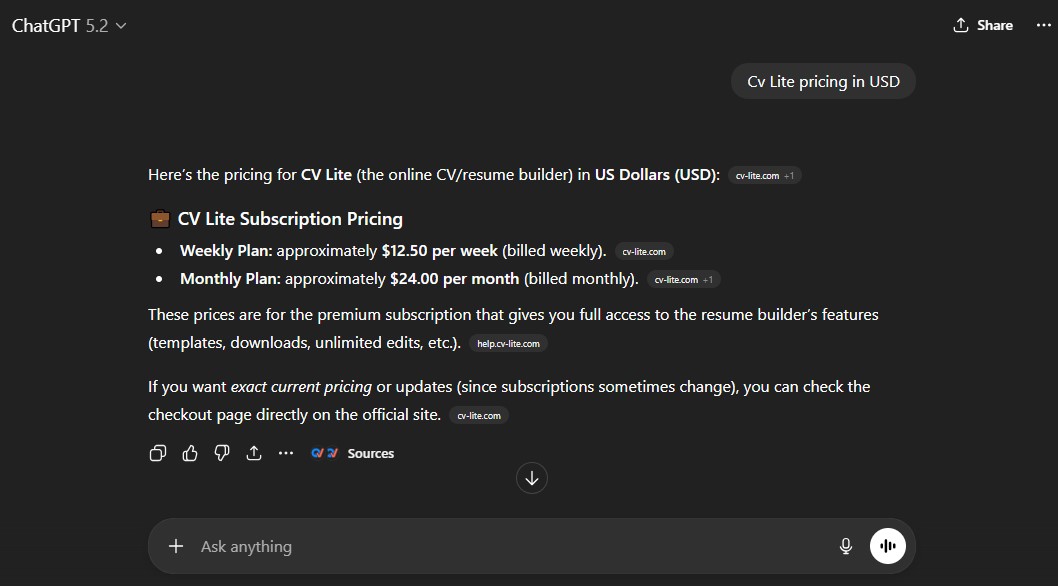
If you're trying to figure out what CV-Lite will actually charge you, get ready for a headache. I’ve used all sorts of resume tools and let me tell you, nothing turns me off faster than “mystery pricing” - and that’s exactly how CV-Lite operates.
Weekly Plan (~$12.50/week)
- So, you might see a weekly charge somewhere on checkout, usually around $12.50 per week. But they don’t actually tell you this upfront-how sketchy is that?
- If you do the math, you’re paying over $50 every month (and maybe even more if you miss a cancellation), but there’s no info about what’s included or if you get any bonus features.
- I find this super risky-you blink and suddenly you're paying $12.50 again and again for the same old thing. And all those credits? They literally disappear if you don’t use them that week. It’s like paying for snacks but someone else eats them.
Monthly Plan (~$24/month)
- There’s talk about a $24 per month plan, but, again, try finding it clearly written on the site! They make you go all the way to checkout before you see anything solid.
- Whether you use your resume credits or not, you’re billed every month for the same package, and those unused credits? Gone, just like with the weekly plan.
- It’s just way too expensive for something you could forget to use, because the system doesn’t even remind you. That’s not fair, especially since a good resume builder should actually help instead of sneaking fees onto your card.
The Real Problems With Unclear Pricing
- CV-Lite hides its prices instead of putting them on the front page. You know what that means? You can’t compare plans, you don’t know what features you’re getting, and you just end up suspicious about everything.
- From my experience, when resume tools don’t show you prices clearly, it almost always means you’re going to get stung by auto-renewals or extra charges you didn’t want.
- As someone who’s job-hunted and reviewed tons of tools, missing details like region-specific pricing, taxes, or a refund policy really makes things stressful. Why make a tough job search even tougher?
Why ResumeJudge Just Makes More Sense
- That’s why I tell everyone: ResumeJudge just makes sense. You pay once-starting at $14 (yep, just fourteen bucks)-and get 50 resume scans that never, ever expire. No subscriptions, no gotchas.
- You get a full ATS optimization toolkit: real resume scoring, keyword insight, a library of templates, and even auto-apply features-all for a price you see upfront.
- The best part? You don’t lose your money if you miss a week or a month, and there’s no mystery checkout. Just pay, use anytime, stress gone.
Curious who wins the “CV-Lite vs ResumeJudge” showdown? Jump to the comparison below.
What are some CV-Lite alternatives?
CV-Lite Alternatives
 ResumeJudge
 MyPerfectResume
 ResumeIO
So, you’ve seen what CV-Lite can do (and where it totally drops the ball). But before you jump in, let’s check out some other options. Here’s my top pick:
#1 - CV-Lite vs ResumeJudge
-
What’s the same: Both CV-Lite and ResumeJudge help you make a CV or resume that looks sharp and professional. You get templates, easy editing, and a way to download your finished doc.
-
Why ResumeJudge is better:
- Real ATS checks, not just fancy looks. ResumeJudge actually scans your resume like the software real companies use, so you know if your CV will get seen by a human or just tossed out by a robot.
- One-click fixes for your job. You can paste in the job you want, and ResumeJudge will instantly tweak your resume to match it. No more guessing what to write or spending hours editing.
- No sneaky fees or subscriptions. You pay once for credits, and they never expire. No surprise charges, no monthly bills, no “oops, we took your money again.”
- Support that actually helps. If you get stuck, ResumeJudge’s support team actually replies and helps you out. No more shouting into the void or waiting forever for a reply.
- Templates that work everywhere. Their designs look good and are made to get past those tricky resume robots, so you don’t get ghosted by companies.
-
Where CV-Lite is better:
- Super simple to use. If you just want to make a basic CV fast and don’t care about all the extra features, CV-Lite is easy to figure out.
-
Pricing:
- ResumeJudge: Pay once for credits (about $19 for 5 credits), and you can use them whenever you want. No subscriptions, no hidden fees, and your credits never disappear.
- CV-Lite: Costs about $12.50 a week or $24 a month, but the prices are hidden and you might get charged extra without knowing. Plus, your credits vanish if you don’t use them.
-
If you want something that’s easy, honest, and actually helps you get interviews, ResumeJudge is the way to go.
#2 - CV-Lite vs MyPerfectResume
-
What’s the same: Both CV-Lite and MyPerfectResume are online tools that help you build a resume from scratch using templates. You just fill in your info, and they spit out a fancy-looking resume you can download, usually as a PDF or Word file.
-
Where MyPerfectResume is better:
- Stronger content suggestions: MyPerfectResume has smart suggestions and gives feedback to make your resume better. It even fixes up your sentences and helps with bullet points.
- Extra career help: You get bonus stuff like interview practice and you can make an online resume profile with your own link.
- More creative options: There are a ton of templates and ways to change up the design, so your resume doesn’t have to look basic.
-
Where CV-Lite is better:
- Super easy to use: Honestly, CV-Lite is super simple-even if you stink at computers, you won’t get lost. It’s got a bunch of CV themes and is really easy to click around without getting confused. But, if you want extras or plan to contact support, you might wanna keep looking.
-
Bottom line: Go with MyPerfectResume if you want more bells and whistles, or if you want extra help with interviews and your writing. Pick CV-Lite if you just want something quick and easy with enough basic designs to get the job done-just watch out for unclear pricing and tricky subscriptions.
#3 - CV-Lite vs ResumeIO
-
What’s the same: Both CV-Lite and Resume.io are easy-to-use online tools that help you make a resume fast, with lots of templates and simple drag-and-drop stuff. They both let you download your resume, and you don’t need to be a tech genius to figure them out. They’re just built for normal people like us who wanna get hired quicker.
-
Where ResumeIO is better:
- Way more transparent about pricing: ResumeIO actually tells you what you’re paying for, up front. No sneaky surprises. CV-Lite kinda hides the costs and you might only find out the real price after you get charged, which can be a shocker.
- Faster, easier exports and AI help: ResumeIO gives you unlimited downloads and lots of templates during your trial or paid plan. Plus, their AI tools and content suggestions work pretty great.
- Security and privacy info is clear: ResumeIO mentions how your data is protected. CV-Lite doesn’t really talk about that stuff, which might bug you if you care about privacy.
-
Where CV-Lite is better:
- Super simple to use: If you just want something basic and straightforward with no frills, CV-Lite is easy to navigate. Even if you’re not great with computers, you’ll figure it out super quick.
That's really it for CV-Lite compared to ResumeIO. If you like things simple and don’t mind unclear pricing, CV-Lite does the basics. But, honestly, ResumeIO feels less risky and a lot more upfront with what you’re getting.
Is CV-Lite Worth It?

Short answer - Definitely NOT worth your money!
Here’s what’s wrong with it:
-
Reason #1: Customer Support Is Basically AWOL: If you ever need help, expect silence or useless answers. And good luck getting your money back or canceling. Usually, they just ignore you.
-
Reason #2: Expensive and Tricky Subscriptions: You might think you’re paying once, but nope-CV-Lite sneakily locks you into a monthly plan. If you don’t use all your credits in a month, you lose them. So in the end, you’re stuck paying for stuff you never got to use.
-
Reason #3: Hidden Charges and Zero Transparency: They don’t tell you clearly what you’ll pay. Sometimes, random charges just show up, and you only notice them after your bank balance takes a hit. Canceling is such a pain that you might just have to call your bank to block them.
Here's a review by cliente ES talking about their experience with CV-Lite.com:
"I want to warn others about my experience with CV-Lite.com. After using their CV builder, the website started charging random or recurring amounts from my account without clear authorization or notice. Many users have reported similar issues online - unexpected subscriptions, hidden fees, and difficulties canceling payments. Please be cautious before entering your payment information or subscribing to any of their plans. If you already used the site, I recommend checking your bank statements and contacting your bank to block further charges. Always read the terms carefully and consider using trusted CV-building platforms instead. Stay safe and spread the word!"
― cliente ES
Honestly, I tried CV-Lite and boy, it felt like they were just waiting for me to make a mistake so they could charge more. I almost missed their sneaky emails about “subscriptions.” Trying to get support felt like yelling at a wall. Every part of the process stressed me out. If you ask me, you deserve a tool that’s upfront and actually helps you-none of this shady stuff.
So, what should you use instead?
At the risk of sounding a little biased, ResumeJudge fixes all the things CV-Lite gets wrong. Let me break it down:

-
#1 Not Another Boring Resume Builder: ResumeJudge isn’t just some random template generator. It actually gets that a beginner, a pro, and an expert all need different stuff on their resumes. Its smart system adjusts its advice and keywords so your resume fits you and the job you want-way more personal than anything else I’ve tried.
-
#2 Your Credits Never Disappear: Seriously, buy credits once and they stay with you forever. No more racing against the calendar or losing money just because you didn’t use all your credits.
-
#3 Real People Actually Reply to You: The team isn’t hiding behind robots. If you send in a support question, they get back to you fast-usually the same day. I’ve always gotten an answer that actually helps.
-
#4 Built by Folks Who Really Know How Hiring Works: The ResumeJudge team has real engineers who built hiring tools at Google. The templates and advice focus on how ATS systems read your resume, not just how it looks. That means you get something that recruiters can actually read and that passes the filters. You don’t have to puzzle together different tools-it’s all in one spot: resume builder, ATS checker, keyword helper, skill matcher, and auto apply. So easy.
That’s it! I hope this clears things up about CV-Lite. If you want something way more reliable, check out ResumeJudge’s website or just grab your 10-scan free trial. No credit card, no phone number needed-just your email, and you’re set.
Share this article:
Ready to optimize your resume?
Use ResumeJudge to scan your resume against any job description and discover what's holding you back.
Free to use • No credit card required