Careerflow Review: I Tried it for 14 Days - Here's What I Found [3 Pros, 5 Cons]
In This Guide:
Read this article if...
you're asking yourself if Careerflow is really worth the buzz? I dove headfirst into it and I’m here to give you the inside scoop.
In this Careerflow review, I’ll share the 3 things Careerflow absolutely nails and the 5 big mistakes it needs to fix (trust me, you’ll want to know these).
Not sure about the pricing or hidden costs? Don’t sweat! I’ve broken down exactly what Careerflow will cost you.
Curious about other options? I’ll walk you through the best Careerflow alternatives I’ve found.
And I’ll finally answer-is Careerflow legit or just another overhyped tool?
Miss this blog and you’ll be missing out on insights from someone who’s actually used it, not just glanced at the homepage.
By the way, the full review covers all the juicy details I wish I’d known before jumping in.
So, grab your favorite drink, kick back, and let me guide you through everything Careerflow.
Feel free to use the table of contents to hop to any section you like!

Careerflow Review Summary
Careerflow Review Summary


If you're in a rush, here's a quick 2-minute summary of this blog:
3 Things Careerflow Does Well
-
LinkedIn Profile Boost: You can use it to make your LinkedIn profile look better, which sometimes helps get more recruiters to notice you.
-
Resume Tailoring: There’s this feature that helps you change your resume for each job, so you don’t have to do it all by yourself.
-
Weak Points Finder: It also points out parts of your resume or profile that could be stronger, so you know what to fix up. This can be especially helpful, though it's worth noting some users have run into frustrations-see more in the cons section.
-
See more on what makes Careerflow useful below.
5 Things That Make Careerflow Super Annoying
-
Customer support is a pain: If you want a refund or need to cancel, you’re stuck waiting forever. The support team barely replies, so you just feel ignored and stuck.
-
Expensive subscriptions that waste your money: They trap you into pricey monthly plans, and if you don't use all your credits, they're gone-no rollovers-so you end up paying for stuff you never used.
-
No quick way to delete your account: You can’t delete your account yourself, and have to email support and wait ages just to get on some “deletion queue.” Your info is stuck with them.
-
Buggy, slow and feels unfinished: Features like autofill barely work on job sites, and even simple things like the resume builder constantly mess up the format and feel clunky.
-
Basic stuff locked behind paywall: The free version hardly does anything and keeps bugging you to upgrade, so you basically have to pay just to do simple things.
-
More headaches with Careerflow right here.
How Much Does Careerflow Cost?
-
Basic Free Plan – This one’s totally free, so you can get unlimited resume analysis without paying anything. But, you miss out on all the AI writing and interview stuff.
-
Premium Plan – Costs $23.99 for a month or $23.99/month billed yearly (so you only pay $23.99 total if paid yearly). You get all the free features plus unlimited AI resumes, ATS optimizer, and bullet writer. It’s good if you want AI help, but I think it’s kinda pricey for just resumes.
-
Premium Plus Plan – For $44.99/month (or $44.99 total if you pay for the year), you get everything in Premium, plus AI mock interviews, interview analysis, and faster support. This seems helpful if you really want interview practice, but honestly, it’s a little expensive.
-
Should you buy Careerflow? If you just need basic stuff, stick to the free plan. For the paid ones, unless you find the interview features super valuable, I’d be careful because you might pay a lot and not use all the tools. More details about the cost right here.
Careerflow Review – What’s Actually Good?
Careerflow Pros
Let’s talk about the three things folks point out the most when using Careerflow:
-
LinkedIn Profile Boost:
- Loads of users say their LinkedIn views shoot up after they use the profile optimization tools.
- Some even mention recruiters reach out to them more once their profiles look more polished.
- The process isn’t hard – you basically follow prompts, and the app guides you to tweak what matters.
-
Resume Tailoring:
- People like that Careerflow helps you change your resume to match each job you find, which can help you land interviews.
- The tool shows exactly what to change, saving you from guessing or rewriting everything by yourself.
- It’s cool for making your application stand out, but a few wish they didn’t have to pay so much to access all features (see the cons).
-
Weak Points Finder:
- Careerflow looks at your resume or LinkedIn and highlights spots that need improvement.
- Users say it gives you simple, actionable tips to actually fix what’s lacking, so you can level up your profile right away.
- This helps you know what’s missing instead of just wondering why you’re not getting noticed.
Here's a user talking about how LinkedIn Profile Optimized helped them:
"It has greatly enhanced my profile views on LinkedIn, and I have since received offers from recruiters in my industry."
― Collins KE
5 Things That Make Careerflow Super Annoying
Careerflow Cons
Let's break down the stuff that really makes Careerflow a pain to use:
-
Customer support is a pain
- When you reach out for help, especially for refunds or cancellations, you end up waiting ages. They leave you hanging and that's super frustrating.
- A lot of folks get ignored by the support team or just get generic replies that don't fix anything.
- You feel stuck, especially if your money’s tied up and nobody is answering your emails.
-
Expensive subscriptions that waste your money
- They push you into pricey plans but if you don’t use all your credits for the month, those are gone for good. It’s kind of like paying for thin air.
- The free version is so limited, it basically nags you to upgrade without letting you test real features.
- If you want to cancel, you go through support, which means more waiting, so you keep getting charged.
Here's a review by CAMILO US discussing issues regarding data practices and account management:
"Besides having a subpar resume building tool that won't stop trying to shove bullets where they don't belong, Careerflow.ai is a frustrating and opaque platform when it comes to user privacy. There’s no option to delete your account directly, which is a basic feature every service handling personal data should offer. Instead, they require you to email support and wait until the end of the month to be added to some “deletion queue.” That’s not just inconvenient—it’s unacceptable and borderline negligent in terms of data protection. Poor Data Practices and No Easy Way to Delete Account."
― CAMILO (US)
-
No quick way to delete your account
- You can’t just delete your account with a click; you have to email support and wait in some weird "deletion queue" until the end of the month.
- Your info is stuck in their system even after you ask to delete it, which just doesn’t feel safe.
- For anything about your privacy, it's way too complicated and takes way too long.
-
Buggy, slow and feels unfinished
- Autofill barely works on most job sites, so you end up doing things manually. That just wastes your time.
- Their resume builder messes up formats and constantly puts bullets where you don’t want them.
- Even simple things glitch or look unprofessional, making the tool feel rushed and sloppy.
-
Basic stuff locked behind paywall
- The free version does almost nothing. You run into paywalls at every step, even for the simplest features.
- Job tracking and insights are mostly manual or just make you go in circles, which isn’t what you signed up for.
- You’re always getting nudged to upgrade, but even paid features feel clunky and limited for what you pay.
Here's a review talking about issues with autofill and resume features:
"Autofill… slow, buggy, or completely non-functional across different job sites." "Resumes… formatting issues and lack of personalization."
― Review Author
By the way, if you're looking for a platform where your credits are valid indefinitely and no subscription is necessary, check out ResumeJudge. You can even get started for free with up to 10 scans available at this link.
That wraps up our in-depth review. Are you interested in exploring additional alternatives to Careerflow? Before we dive into those options, let's first discuss pricing!
What Does Careerflow Cost?
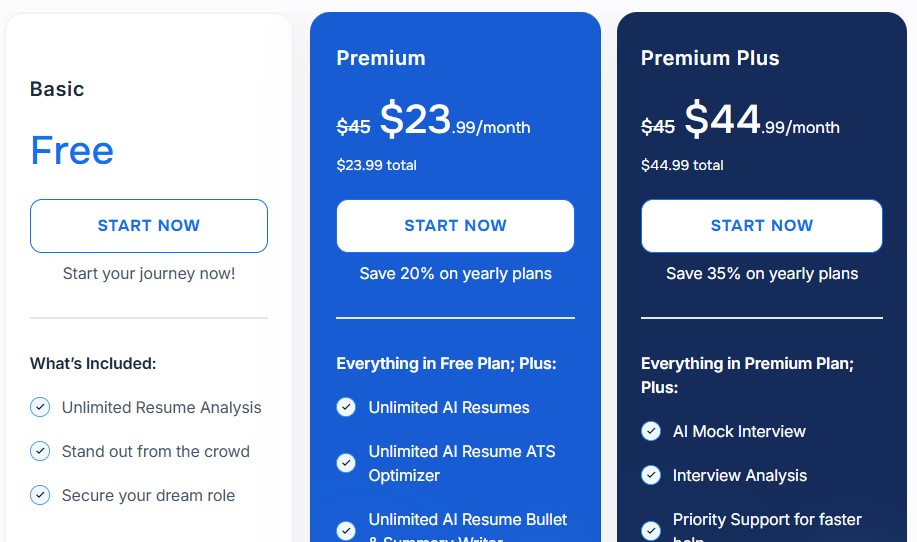
Alright, let me break down what Careerflow actually charges and why honestly, I don’t think it’s worth it. Let’s go, plan by plan:
Basic Free Plan
- Sure, it’s free, but you only get unlimited resume analysis and that’s it. No fancy features, just a very basic scan that frankly, you can get from a bunch of other sites for free too.
- There’s no AI resume building, no real deep LinkedIn help, no mock interviews, none of the goodies everyone talks about. It’s so bare bones, you’ll probably outgrow this in the first week.
- Honestly, I've used this, and after the first analysis, it just nags you to upgrade. You can’t really get much real value unless you start paying up.
Premium Plan ($23.99/month, $45 if you go monthly)
- Now for this one, you’re paying $23.99 every single month if you choose yearly, or a crazy $45 per month if paid monthly-just for getting unlimited AI resumes, resume optimization, and AI bullet/summary writing.
- Look, every month you’re paying for the exact same unlimited credits, but if you don’t use them, they’re gone. No rollover, no mercy. It’s literally like buying concert tickets every month and not even going!
- In my own experience, you use it heavy for one or two weeks, and then most of the time it just sits there, quietly eating away your money. Each resume tweak costs you, EVERY. SINGLE. MONTH.
Premium Plus Plan ($44.99/month, $45 if you go monthly)
- This plan adds a couple of cool things-AI mock interviews, interview analysis, and faster priority support-on top of the Premium features. But they want $44.99 PER MONTH, or $45 if you pay monthly. That’s over $500 a year!
- Again, your credits expire monthly, so if you forget or get busy (which most of us do), you’re out of luck and out of money, too. None of these “plus” perks stick around if you skip a month.
- From my own use, mock interview tools are honestly neat, but there are tons of free alternatives online. And “priority support” doesn’t really make the platform better-it just means you wait a little less for help that you rarely need.
Here’s what really bugs me…
- Why are you paying Careerflow every month for the SAME features and the same credits? If you skip a month, or don’t need to update your resume every week, you’re just throwing money away.
- I’ve tried a bunch of these tools, and trust me, the subscription model here is just not friendly for job seekers. Hunting for jobs is already stressful, you shouldn’t have to worry about wasted money if you’re busy one month.
Let me tell you about a smarter option…
- With ResumeJudge, you get everything you need in a REAL all-in-one platform-ATS scanning, AI resume and cover letter builder, keyword matching, auto-applier, and way more-for just a one-time payment starting at $14. No subscriptions, no monthly charges.
- The best thing? Your credits never expire. You pay once, get 50 scans, and use them whenever you want, even if it’s next year. No pressure, no wasted money, just real value.
- If you wanna see how Careerflow actually compares to ResumeJudge, check out this head-to-head comparison section below.
What are some Careerflow alternatives?
Careerflow Alternatives
 ResumeJudge
 CareerFlow
 Huntr
Huntr
So, you’ve checked out Careerflow and maybe you’re not totally sold. No worries - there are other options out there! Here’s my take on the top pick:
#1 - Careerflow vs ResumeJudge
-
What’s the same: Both Careerflow and ResumeJudge use AI to help you fix up your resume, make your LinkedIn look better, and give you tips to get more interviews. They both scan your resume, spot weak spots, and try to help you stand out to recruiters.
-
Why ResumeJudge is better:
- Real ATS checks, not just surface stuff. ResumeJudge actually compares your resume to the job you want, using smart AI to find what’s missing and show you exactly what to fix. It’s not just about making your resume look pretty - it’s about getting past those tricky computer systems that companies use.
- One-click resume fixes. You can upload your resume and the job description, and ResumeJudge will tell you what to change in just one click. It’s super fast and easy, even if you hate editing.
- All the tools in one place. ResumeJudge gives you everything: ATS scanner, resume builder, keyword checker, LinkedIn optimizer, bullet point helper, and even a tool to help you apply to jobs automatically. No jumping between a bunch of websites.
- No annoying subscriptions. You just buy credits once, and they never expire. No monthly bills, no pressure to use everything right away.
- Support that actually answers. If you get stuck, ResumeJudge’s support team actually replies fast and helps you out. (Unlike Careerflow, where you might wait forever.)
- Made by real resume experts. The advice you get is actually useful and helps you get interviews, not just a bunch of random tips.
-
Where is Careerflow better?
- Careerflow is a bit cheaper if you only want the free stuff, and it has some interview practice tools. But honestly, if you want your resume to actually get noticed and you hate dealing with subscriptions or slow support, ResumeJudge is just way easier and more helpful.
If you want something that’s simple, works fast, and actually helps you get interviews, I’d go with ResumeJudge over Careerflow any day.
#2 - Careerflow vs CareerFlow
-
What’s the same: Both Careerflow and CareerFlow say they want to help you land a job faster. They both use tools with AI to help you fix up your resume, make your LinkedIn better, and keep track of jobs you want. Yeah, their names are almost the same, and honestly, their features look pretty alike too.
-
Where Careerflow is better:
- LinkedIn helper: Careerflow makes it stupid easy to polish up your LinkedIn so recruiters might actually see you.
- Points out weak spots: It literally tells you what’s lame about your resume or profile, so you don’t have to guess what’s holding you back.
-
Where CareerFlow is better:
- Cheaper paid options: CareerFlow’s pro plan starts lower than Careerflow’s, so you might save some cash if you just want the basics like basic resume help.
- Quicker to get started: You can set up and start playing with the CareerFlow tools super fast, and the layout feels simpler.
Want the easy answer?
If you mostly just want to know what’s wrong with your profile or resume, I’d say Careerflow is handy for that.
If you just want quick help for less money, CareerFlow isn’t bad.
But if you hate annoying customer support or clunky features, honestly, both have their headaches, so just try the free version first!
#3 - Careerflow vs Huntr
-
What’s the same: Both Careerflow and Huntr are job search tools that help you track your job applications and build or tweak your resumes. They use AI to help make the whole process easier, so you don’t have to do everything by yourself.
-
Where Huntr is better:
- Super simple job tracking: Huntr is really easy to use if all you want is a job tracker that helps you organize jobs, contacts, reminders, and documents without getting too complicated.
- Affordable and useful free plan: Huntr gives you a decent free plan that actually works for tracking and basic features, so you don’t have to pay to get started.
- No useless paywalls: Most of the core stuff actually works in the free version, unlike Careerflow which locks a lot behind paid plans.
-
Where Careerflow is better:
- LinkedIn help built in: Careerflow can brush up your LinkedIn profile, which is handy if you want recruiters to spot you more.
- Finds weak spots: The tool points out weak areas on your resume or profile, so you know what to fix.
- Easy resume tweaks: It quickly rewrites your resume for every job you apply to.
-
Bottom line: Huntr is better if you just want something simple to keep track of your job search and don’t want to pay for basic stuff. But Careerflow has more tools for making your LinkedIn shine and for telling you what to fix on your resume-just be careful with the expensive plans and sometimes-buggy features. If you’re all about LinkedIn or like having your resume rewritten for you, you might like Careerflow, but for just tracking, Huntr is probably easier.
Is Careerflow Worth It?

Short answer - Nope, not really!
Here's why:
-
Awful Customer Support: If you ever need something (like a refund or want to cancel), you're basically shouting into a void. Support barely replies, so you end up just waiting and feeling ignored.
-
Wasted Money on Credits and Expensive Plans: You pay a lot every month, but if you don’t use all your credits, tough luck-they disappear. No rollovers, no second chances, and it’s super easy to pay for things you never even got to use.
-
It’s Buggy and Super Basic Unless You Pay: Tons of features constantly glitch, the resume builder is frustrating, and even the autofill is broken on most sites. Plus, the free version can’t do almost anything unless you pay, so it’s just upgrade nagging all the time.
Here's a review discussing some concerns with the platform:
"Requires more manual input than expected… job tracking largely manual.” “Free version severely limited… pushes expensive premium."
― Anonymous
So… what should you actually use for your job search?
Honestly, ResumeJudge blows Careerflow out of the water. Here’s how:

First, you actually get a real free trial with 10 completely free scans. That means you can check out all the important features-no credit card tricks, just your email.
-
#1 It Fits YOU-Not the Other Way Around: ResumeJudge tweaks its features depending on who you are. High schooler? College grad? Mid-career? It helps you build, scan, optimize, fix keywords, and more, all based on exactly what you need for your specific job level or field. You don’t waste time or jump through a bunch of hoops.
-
#2 Credits Never Expire: Unlike Careerflow, you won’t lose your credits if you don’t use them right away. Get more only when you need them-no stress, no wasted cash.
-
#3 Real, Fast Support: ResumeJudge actually talks to you like a real human. If you need help, you’re not stuck with a chatbot or waiting days. Most responses come in less than 12 hours, sometimes way faster.
-
#4 Built By People Who Really Know Hiring: The brains behind ResumeJudge are Google engineers who’ve tackled real applicant tracking systems (ATS) themselves-so all the resume tips, templates, and checks are designed for what recruiters really want. No more guessing, no more juggling different tools, and all in one simple dashboard.
That’s basically it! I hope this helped you figure out whether Careerflow is right for you. And hey, if you’re still on the fence, give ResumeJudge a try-it’s easy to start your free trial (just your email needed, nothing else). You’ve got nothing to lose, and maybe your next job interview to gain!
Share this article:
Ready to optimize your resume?
Use ResumeJudge to scan your resume against any job description and discover what's holding you back.
Free to use • No credit card required