Canva.com Resumes Review: I Tried it for 14 Days - Here's What I Found [3 Pros, 5 Cons]
In This Guide:
Read this article if...
you're scrolling through Canva.com Resumes and wondering if it's actually worth the hype. I've gone deep-diving into Canva.com Resumes, and I'm sharing everything you wish someone told you earlier.
I'm spilling the beans on the 3 things Canva.com Resumes does really well - and trust me, there are some surprises!
But that's not all… I'll get brutally honest about the 5 big mistakes Canva.com Resumes makes that nobody talks about.
You wanna know what Canva.com Resumes costs? I break down the pricing so you know exactly what you're getting into (and what you aren't).
If you're hunting for other options, I've got some solid Canva.com Resumes alternatives lined up for you.
Oh, and if you're skeptical-I'll answer: Is Canva.com Resumes legit or just another flashy online tool?
Honestly, if you skip this Canva.com Resumes review, you might miss out on tips that could literally decide whether your next job application stands out or sinks.
I've sifted through templates, played designer, and read more reviews than I'd like to admit-so you're getting the real scoop!
So, grab your favorite snack, and let's dig in together.
P.S. The handy table of contents is right here, so it's easy to jump straight to the Canva.com Resumes review section you care about!

Canva.com Resumes Review Summary
Canva.com Resumes Review Summary


If you're in a rush, here's a quick 2-minute summary of this blog:
3 Things Canva.com Resumes Does Well
-
Easy-to-use templates: You get a bunch of ready-made designs, and you just pick one and fill it in, which makes things simple.
-
Resume editing: You can change up your resume pretty easily-add your details and move stuff around without much fuss. But, keep in mind that some users report occasional issues with customer support or find it a bit pricey, as you can see in the cons section.
-
Multi-purpose design: It’s not just for resumes; you can use it to make stuff like invitations and cover letters too.
5 Big Problems With Canva.com Resumes
-
Customer service is a pain: If you need a refund or want to cancel, good luck! You’ll get bounced around with unhelpful steps and almost no real support from anyone on their team.
-
You lose money on unused credits: Canva makes you buy a subscription, but unused credits vanish every month. So you end up paying for stuff you never even use.
-
Frequent site outages: The site goes down a lot, making you wait forever to finish your resume. If you have a deadline, get ready for a major headache.
-
Editing and downloading are confusing: Just trying to edit or download your resume is frustrating. Their instructions don’t match what you see, and there’s almost no real help if you get stuck.
-
Formatting breaks your work: Sometimes, after spending hours making your resume, the fonts or colors change for no reason, or files won’t upload anywhere. That’s a lot of work down the drain.
What Does Canva.com Resumes Cost?
-
Free Plan – This one costs nothing, which is cool, but you don’t get all the fancy stuff and there’s only 5GB storage. It’s okay if you just want to try things out.
-
Pro Plan – For $15/month, you get loads more templates (over 3.6 million), way more stock images, and 1TB storage. But, it adds up quick if you aren’t using everything.
-
Business Plan – This is $20/month per person, so it gets pricey if you’ve got a team. You get better tools for working together, 100 brand kits, and 500GB storage – but honestly, if you don’t need to collaborate, it’s probably overkill.
-
Enterprise Plan – There’s no price tag listed, so you’ll have to talk to their sales team. It’s got a lot of security stuff and is good for big companies, but seems complicated if you’re just making your own resume.
-
So, should you buy Canva.com Resumes? I’d say no for most people-the free plan is fine for simple use, but paid plans get expensive fast for resumes. More about the cost here.
Canva.com Resumes Review - What Does it Get Right?
Canva.com Resumes Pros
Here are 3 things most people like (and honestly, I think you'll see why):
-
Easy-to-use templates:
- You get a big bunch of templates that you just pick and fill out. It means no staring at a blank page.
- People like Peggy say it actually helps you figure out what to put in your resume.
- Lots of folks say the templates save time, but don’t expect them to be super unique.
-
Resume editing:
- You can add, move, or change stuff on your resume really without much hassle.
- Users like how you don’t need any special skills to quickly edit and update things.
- Some get annoyed that resizing stuff now costs money, which is kind of frustrating. You can read more about that in the cons section.
-
Multi-purpose design:
- It’s handy because you can whip up other things too, like invitations or cover letters.
- Alyssa and Josh both used Canva for more than just resumes, so it works for lots of needs.
- If you want everything in the same style, you can keep all your documents looking neat and matching.
Here's Peggy S. talking about how the service showed her how to tailor her resume properly:
"Rated 5 out of 5 stars showed me how to tailor resume properly"
― Peggy S.
5 Big Problems With Canva.com Resumes
Canva.com Resumes Cons
Alright, here’s the real tea on Canva.com Resumes: these are the five things that totally drive people nuts.
-
Customer service is a pain
- Honestly, if you need help, you’re stuck with a bot that just shoots you to the same useless help page over and over.
- When you try to cancel, the cancel steps they list don’t even exist-and it feels shady, like they just want your money.
- It’s so hard to reach an actual person. Even messaging on Facebook just gets you an auto-reply saying they’re “busy.”
-
You lose money on unused credits
- Canva forces you into a subscription, but if you don’t use your credits in time, poof-they secretly disappear every month.
- You can’t get back what you paid for, and there’s no warning or help from Canva when this happens.
- You basically pay for things you never use, which just feels like a rip-off rather than a creative tool.
Here's a review by Kara AU about their subscription cancellation experience:
"SCAM ALERT SCAM ALERT! Do not subscribe if you ever want to unsubscribe because it is literally impossible! When you click on cancel plan a pop up trying to convince you to not cancel comes up and give you two options: keep the subscription or go to google to manage subscriptions. Upon entering the google subscription manager you are only given the option to suspend any further payments for up to 3 months, after which time payments will resume. Went to the help page to see if I was doing something wrong and it gives you step by step instructions on how to cancel your plan, except that those steps do not exist!! Either through the website or through the mobile app. It is outrageous and criminal that a. It is so difficult to cancel the subscription, b. It is actually not possible to cancel altogether, just stop payments for 3 months and c. The help page gives you steps that don't actually exist, therefore are of no help whatsoever. The website only has an AI assistant that directs you to the same help page and have messaged their facebook page which pops up with an automated message about how busy they are so hopefully they will get back to you at some point. I am fuming that I didn't look up the reviews before subscribing as I can see this is not a new problem, I never would have signed up had I known how shady they are."
― Kara AU
-
Frequent site outages
- The site goes down all the time-sometimes four or five times a day. This messes up your flow way more than you can handle.
- If you’ve got a deadline, you’re honestly out of luck because Canva just leaves you hanging for hours.
- It’s honestly ridiculous for a service that people pay for, especially if you’re depending on it for work.
-
Editing and downloading are confusing
- Trying to edit or download your resume feels like playing a game where none of the rules make sense.
- The instructions on the help page don’t even match what’s actually on the website, so you end up totally lost.
- If you don’t understand something, there’s basically no help for you, and you’re just stuck.
-
Formatting breaks your work
- After you spend ages making your resume look just right, Canva can randomly change your fonts, colors, or sizes – no warning.
- I’ve lost hours of work this way, and sometimes, when you finally go to download, the files just won’t work anywhere else.
- You really waste a ton of time fixing things Canva ruins for no reason-super frustrating if you need a resume to upload.
Here's a review by Jonathan Patterson talking about their experience with the software:
"Horrible software lost me 10+ hours of work. Spent hours designing a resume, then found all versions available for download were for some reason unusable everywhere I tried to upload it. Spent hours more putting it on a different template. Then their software flipped all my text settings to a different color, size, and font. Absolutely horrible software. You'll waste many hours just trying to get your work off the site."
― Jonathan Patterson (US)
If you're searching for a resume tool without recurring fees and where your credits remain valid indefinitely, consider Canva.com Resumes. You can also test it out at no cost with up to 10 scans right here.
That wraps up our in-depth analysis. Interested in exploring more alternatives to Canva.com Resumes? But first, let's cover the pricing details!
What Does Canva.com Resumes Cost?
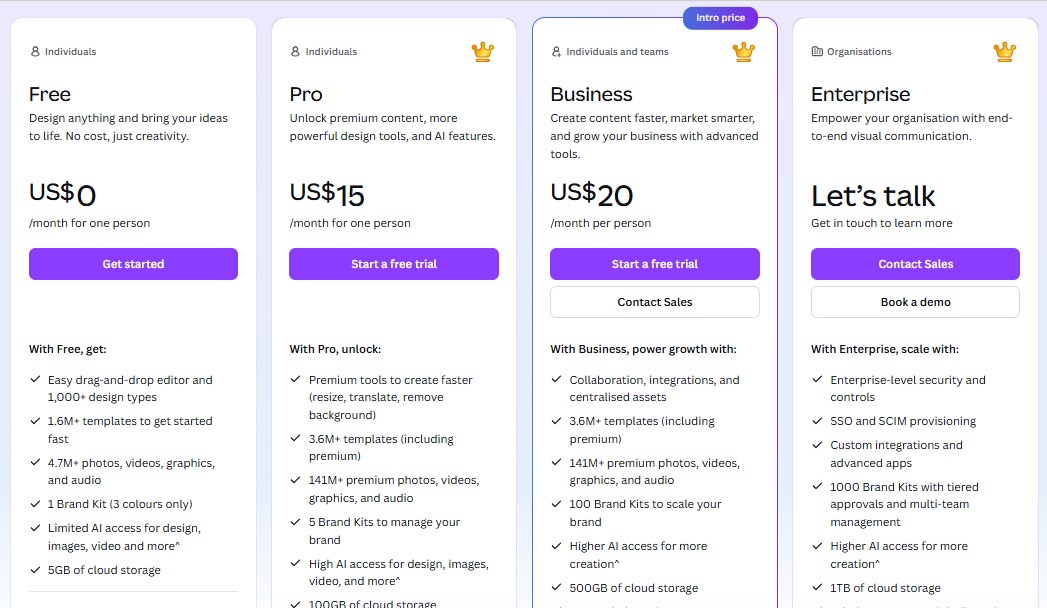
Let me walk you through Canva.com Resumes and why I honestly think it's not the best deal for your money, especially when you’re hunting for a smart, affordable resume helper. Here’s what’s up with their plans:
Free Plan ($0/month)
- Sure, Canva brags about offering a free plan that lets you design simple resumes and play around with a drag-and-drop editor. You get over 1,000 designs and access to stock images and graphics, and it sounds all cool at first glance.
- But real talk? You hit a wall quick-AI tools and features are super limited, your brand choices are basic, and you only get 5GB storage. Plus, almost every “fancy” resume feature or template you see online is locked away behind a paywall.
- In my experience, you end up getting FOMO and are basically nudged to shell out more for the Pro plan anyway.
Pro Plan ($15/month per person)
- On Pro, you cough up $15 every single month (and that's just for you-no team sharing). So you’re handing over $180 per year, and what do you get? More templates, more stock images, higher AI limits, some brand kits, and 1TB of cloud space.
- Sounds shiny… until you realize you’re paying every month for the same “premium” features-even if you only need a resume for job hunting once! Your money just evaporates, and none of the credits or perks roll over if you don’t use them.
- From my own use: it’s all too easy to forget you’re even subscribed. Months pass, and you’re charged again just for the “privilege” of having access, even if you don’t need it anymore!
Business Plan ($20/month per person)
- This one’s even pricier-$20 each month for just one user. It claims to have more “business-y” tools like team collaboration and advanced brand management, plus better AI access. But again, you’re paying this fee over and over whether you use their extra features or not.
- You get more marketing and collab stuff, but honestly, if all you need is a standout resume, this is just overkill. The bigger storage (500GB vs 1TB on Pro? huh!) doesn’t even make much sense for a resume tool.
- I tried this with a group once-unless you’re managing a huge creative brand, most of what you pay for just goes unused. Plus, those monthly charges stack up fast!
Enterprise Plan (Contact for pricing)
- The Enterprise option is pretty mysterious-no price tag, but you know what that means: If you have to ask, you can’t afford it. It’s aimed at giant companies with branding and team management drama, but you get charged who-knows-what and stick your company into another long, expensive contract.
- Great if you run a big organization and crave admin tools, but for resumes? Complete overkill. And those big contracts? You’re locked in, paying again and again for “credits” you’ll never use up.
- Every month you are forced to justify your spend, while never fully owning the features or credits.
Here’s what really bothers me:
- No matter which Canva.com Resumes plan you pick, you’re paying a subscription for the same thing every month. Miss a month? Tough luck, your money’s gone and those “credits” or access don’t even stick around. There’s no pay-once, use-forever option.
- If you want to just make or update a resume a couple times a year, you end up wasting a crazy amount of money over time.
Now, check this out instead:
- ResumeJudge seriously beats Canva for resumes. For just $14 one-time you get 50 resume scans, real ATS scoring, keyword suggestions, and templates. No recurring fees, no expiring credits.
- You get to keep what you pay for-forever. Even if you don’t use all your scans right away, they’re always there when you need them.
- It does way more than just make your resume look pretty-it actually helps you pass resume robots (ATS) and get noticed, which is the whole point of a resume tool, right?
- Want to see why ResumeJudge is so much better than Canva.com Resumes? Check out the full comparison here.
What are some Canva.com Resumes alternatives?
Canva.com Resumes Alternatives
 ResumeJudge
 MyPerfectResume
 ResumeIO
So, you’ve checked out Canva.com Resumes and maybe you’re wondering, “Is there something better out there?” Let’s check out the top pick:
#1 - Canva.com Resumes vs ResumeJudge
-
What’s the same: Both Canva.com Resumes and ResumeJudge help you make a resume with templates and easy editing. You can pick a design, fill in your info, and download your resume.
-
Why ResumeJudge is better:
- Real ATS checks, not just pretty looks. ResumeJudge actually scans your resume like the robots (ATS) that companies use, so you know if your resume will get seen by a real person.
- One-click job matching. You just paste the job you want, and ResumeJudge updates your resume for you. No guessing, no hours of editing.
- No wasted money. You buy credits once, and they never expire. No monthly fees, no losing credits you paid for.
- Super helpful support. If you get stuck, real people help you out fast. No endless waiting or confusing answers.
- Templates that work everywhere. ResumeJudge’s templates are made to look good and work with all the job sites and company systems.
-
Where Canva.com Resumes is better:
- Tons of design options: If you want your resume to look super artsy or you need to make other stuff like invitations, Canva’s got a lot of choices.
If you want a resume that actually gets past the robots and into the hands of real people, ResumeJudge is the way to go. It’s easy, you don’t waste money, and you get real help when you need it. Canva.com Resumes is cool for fun designs, but if you’re serious about landing a job, I’d pick ResumeJudge every time.
#2 - Canva.com Resumes vs MyPerfectResume
-
What’s the same: Both Canva.com Resumes and MyPerfectResume let you build cool-looking resumes online. You get a bunch of ready-made templates, you just fill ‘em in, and you can download your resume as a PDF or Word doc. Both have some free options and some stuff you gotta pay for.
-
Where MyPerfectResume is better:
- Awesome tips and writing help: MyPerfectResume gives you smart ideas and wording for your resume-so you sound super professional, even if you’re not sure what to write.
- Extra job tools: You get more than just resumes-like help with interviews and even making your own online profile that you can share.
- Loads of template choices: Tons of ways to make your resume look just the way you want. More styles to pick from than most resume makers.
-
Where Canva.com Resumes is better:
- Easier for visual stuff: If you want your resume to look really “design-y” or you like dragging things around and customizing them, Canva makes that fun and simple.
- Make more than just resumes: You can use Canva to whip up flyers, business cards, invitations-pretty much anything you want, all in one spot.
-
Pricing:
- Canva.com Resumes has a free plan that's great for basic resumes, but if you want lots of fancy templates or extra features, it starts at $15/month (and goes up for teams). To be honest, that adds up fast if all you need is a resume.
- MyPerfectResume lets you make a resume for free, but to actually download or print it, you’ll pay about $2.95 for a 14-day trial or $5.95/month. It’s clear what you’ll pay and you only shell out when you need the downloads.
So at the end of the day-if you want cool designs and maybe need to make more than just resumes, Canva is super handy. But if you want more writing help and job tools, MyPerfectResume wins.
#3 - Canva.com Resumes vs ResumeIO
-
What’s the same: Both Canva.com Resumes and Resume.io let you make resumes right in your browser using easy templates. You can swap out info, move things around, and both sites hand out PDF/Word downloads. They're both super visual, good for folks who like to click, drag, and not mess around with formatting.
-
Where Resume.io is better:
- Downloads are way simpler: Resume.io makes it super easy to get your resume once you’ve made it-just hit download, no headaches.
- No random design mess-ups: Resume.io usually keeps your fonts and layouts the way you set them, so you don’t get weird surprises when you save your doc.
- AI tools and privacy vibes: Resume.io talks up its AI resume help and its strong privacy features (like 256-bit encryption), so you know your info is pretty locked down.
-
Where Canva.com Resumes is better:
- Loads more design choices: Canva gives you a massive pile of shiny templates and lets you drag in pictures, shapes, and other stuff-not just text. It’s fun if you want your resume to stand out and look snazzy.
- Free to start: You don’t have to pay to try Canva’s basic resume tools (but don’t expect every single cool feature).
So, if you mostly care about a resume that’s quick and looks “normal,” Resume.io is way less hassle. If you love playing with design and want something that pops, Canva.com Resumes is your playground-but be ready for a glitch here and there.
Is Canva.com Resumes Worth It?

Short answer - Nope, NOT REALLY!
Here's why:
-
Reason #1: Awful Customer Service: If you ever need help, want a refund, or just have a question, good luck. You’ll get bounced around or feel ignored, and it’s honestly just super frustrating.
-
Reason #2: You Lose Money on Unused Credits: Canva forces you into a subscription. But your unused credits? They disappear at the end of every month. So you’re basically paying for stuff you never even use.
-
Reason #3: Super Buggy and Confusing: Site crashes are way too common, editing feels like a maze, and sometimes the fonts or colors break out of nowhere. And don’t even get me started on downloading your resume-half the time, the guide doesn’t even match what you see.
Here's a review by Robert Hughes GB about Canva's service issues:
"This is THE most irresponsible and incompetent company I have ever come across. I can't believe the amount of downtime and outages they allow on the platform, nor how they treat their paying customers. I am a pro user and I need graphic design for my brand. Canva is not, I repeat NOT a viable solution if you are using it for business purposes. You are constantly forced to wait, typically up to an hour at a time, literally four or five times a day, for the outage to clear before you can resume, totally disrupting your workflow. It is impossible to finish your work to a deadline, even a long deadline. Simply put, this product is severely broken. I am switching to another product, demanding a refund, and never EVER going back to Canva."
― Robert Hughes GB
So, what should you do instead?
Honestly, ResumeJudge fixed every single headache I had with Canva.com Resumes. Let me break it down for you:

First off, you can try it for free, with 10 scans-no credit card, no nonsense. But what really makes ResumeJudge stand out:
-
#1 It’s Actually Made for You: ResumeJudge knows a college kid and an expert shouldn’t use the same old template. Unlike Canva.com Resumes and the other cookie-cutter sites, it builds and tweaks your resume based on your job, your background, even your career level. So your resume sounds and looks like YOU, not just some copy-paste thing.
-
#2 Your Credits Never Expire: When you buy credits, they stay there forever. If you don’t use them, they’ll be ready for you whenever you need them. No more vanishing credits or wasted money.
-
#3 You Get Real Help, Fast: With ResumeJudge, you’re talking to real people, not some robot or endless ticket system. I’ve actually gotten replies in under an hour sometimes. They really care.
-
#4 Built by ATS Experts: The folks behind ResumeJudge actually know how real recruiters and their software read resumes. They made the whole tool to help you pass those automatic filters. You get easy templates, an ATS scanner, and all the keyword tricks in one place. No bouncing around between tools and no more guessing what works.
Alright, that’s my take! Hopefully, this makes it clear why Canva.com Resumes just isn’t worth it-and what you can try instead. If you want to check out ResumeJudge, here’s the website and you can jump right into your 10-scan free trial. You don’t need a credit card or even your phone number - just toss in your email, and boom, you can start!
Share this article:
Ready to optimize your resume?
Use ResumeJudge to scan your resume against any job description and discover what's holding you back.
Free to use • No credit card required